Instantly generate stunning, accurate marketing materials and step-by-step guides with just one prompt. TipTinker shows you how Google’s new AI turns text into flawless visuals, a skill that will revolutionize your workflow.
Creating high-quality, visually appealing instructional guides for marketing campaigns can be a slow, expensive process. It requires graphic designers, copywriters, and multiple revisions to get it right. But what if you could generate a complete, accurate, and brand-aligned guide in just 10 seconds? That’s the game-changing power of Nano Banana Pro, Google’s latest reasoning image engine.
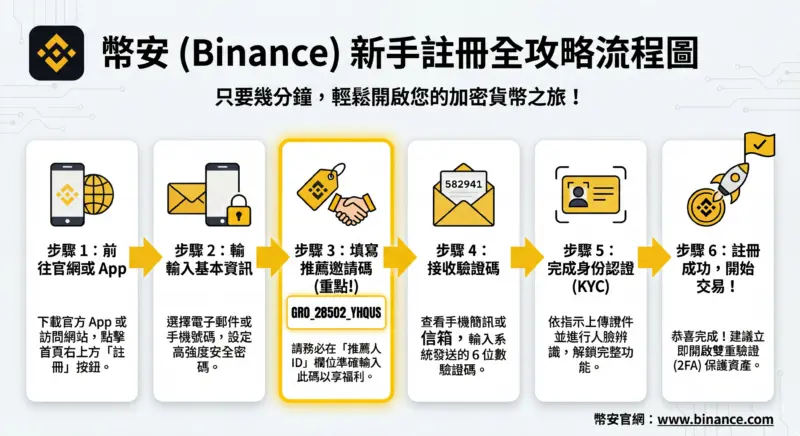
Recently, a user demonstrated this incredible capability by creating a detailed Binance registration guide, complete with accurate Traditional Chinese text and a specific referral code, from a single prompt. At TipTinker, we’re here to break down how you can leverage this same power for your own projects.
The One-Prompt Marketing Team
The magic behind this feat lies in a well-crafted prompt that gives the AI all the context it needs. Nano Banana Pro isn’t just generating a pretty picture; it’s reasoning about the steps, layout, and details required.
Here is the original prompt that produced the impressive result:
Help me draw a step-by-step tutorial DM for "applying for Binance". Explain each step in Traditional Chinese. The image should have the Binance logo and also include my Binance referral code: GRO_28502_YHQUS
Let’s break down why this prompt is so effective:
- Clear Goal:
draw a step-by-step tutorial DM - Core Subject:
applying for Binance - Specific Constraints:
Explain each step in Traditional Chinese,The image should have the Binance logo,include my Binance referral code: GRO_28502_YHQUS
The AI interprets these commands not as separate requests, but as a holistic set of rules for a single, coherent visual output.
How to Create Your Own AI-Generated Guide
Ready to try it yourself? You can access this powerful technology through Google’s AI interfaces. Follow these steps to create your own guide.
Step 1: Open your AI interface of choice, such as Google’s Gemini (gemini.google.com) or AI Studio (aistudio.google.com).
Step 2: Craft your prompt with specific details. Think like you’re briefing a designer. Be clear about your objective, content, and any specific elements that must be included.
Step 3: Define the core elements. Your prompt should clearly state the:
* Topic: What is the guide about? (e.g., “Setting up a new smartphone”)
* Format: What kind of visual is it? (e.g., “infographic,” “flyer,” “tutorial DM”)
* Text & Language: What text should appear, and in which language?
* Branding: What logos, colors, or codes must be included?
Step 4: Generate & Refine. Run the prompt. If the first result isn’t perfect, don’t be afraid to add more clarifying details to your prompt and try again. For example, you could add “Use a clean, minimalist style” or “Make the logo prominent at the top.”
🚀 Pro-Tips for Flawless Results
To get the most out of Nano Banana Pro, keep these best practices in mind.
| Do This | Not That (Less Effective) |
|---|---|
| Be Specific & Direct: “Create a 4-step guide to brewing coffee using a French press. Use simple icons for each step.” | “Make me a picture about coffee.” |
| Include All Key Elements: “Add the logo for ‘ZipCode Coffee’ and the slogan ‘Brewed in a Blink’.” | “Put a logo on it.” |
| Specify Layout & Style: “Design a vertical infographic with a blue and white color scheme.” | “I need an infographic.” |
| Combine Actions in One Prompt: Ask for the visual, text, logo, and codes all at once for better coherence. | Generating an image and then asking the AI to add text in a separate step. |
A New Era for Content Creation
The ability of models like Nano Banana Pro to understand and render complex, language-specific instructions with perfect accuracy is more than just a novelty. It represents a fundamental shift in how we can produce high-quality marketing and educational content. By mastering the art of the detailed prompt, you can significantly accelerate your workflow, reduce costs, and unlock new creative possibilities.
Go ahead and integrate this into your workflow today and see the difference. The future of design is here, and it starts with a single sentence.
📚 Further Reading & Resources
- Access the tool via Google Gemini
- For developers, explore capabilities in Google AI Studio