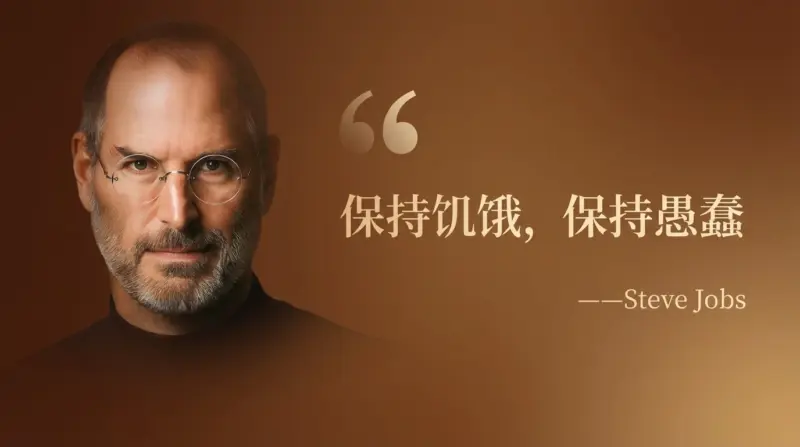
Creating compelling visuals for social media or presentations can be a time-consuming challenge. You need graphics that are not only beautiful but also consistent and professional. While AI image generators have come a long way, controlling layout and text has often been a struggle—until now. With Google’s Nano Banana Pro, a new level of precision is possible.
At TipTinker, we’ve found a powerful prompt that leverages Nano Banana Pro’s advanced capabilities to create stunning “Golden Quote Cards” in seconds. This guide will break down the prompt, show you how to use it, and give you the pro-tips you need to customize it for any occasion.
What Makes Nano Banana Pro a Game-Changer?
Nano Banana Pro is Google’s state-of-the-art image generation model, built on the powerful Gemini 3 Pro. Unlike its predecessors, it features a sophisticated “reasoning core.” This allows it to understand complex instructions about layout, text, and style with remarkable accuracy. Key strengths include:
- Flawless Text Rendering: It generates crisp, legible text directly in the image, even in multiple languages.
- Precise Layout Control: You can specify the exact composition of elements, like placing a portrait on the left and text on the right.
- High Fidelity: It produces studio-quality images up to 4K resolution, perfect for professional use.
These features make it the ideal tool for creating structured graphics like the quote card we’re about to build.
The “Golden Quote Card” Prompt
This prompt is designed to produce a sophisticated, wide-format card featuring a person’s portrait and a quote. Its detailed structure is what makes it so effective.
Here is the base prompt, which we’ve translated and adapted from the original concept shared by stark_nico99 on X.
A wide-format celebrity quote card. Brown background, serif font in light gold for the text "Stay Hungry, Stay Foolish". Smaller text below reads "— Steve Jobs". A large, faint quotation mark appears before the main text. The person's portrait is on the left, and the text is on the right. The text occupies 2/3 of the frame, while the portrait occupies 1/3. The portrait has a subtle gradient transition effect.
[Image: A generated quote card showing Steve Jobs on the left and the quote “Stay Hungry, Stay Foolish” on the right, following the prompt’s description.]
Step-by-Step Guide to Creating Your Own Quote Card
Ready to try it yourself? It only takes a few steps. You can use this prompt in any interface that supports Nano Banana Pro, such as Gemini or Google AI Studio.
- Open Your Tool: Navigate to gemini.google.com or aistudio.google.com.
- Copy the Prompt: Copy the Markdown code block above.
- Customize the Content: This is where you make it your own.
- Change the quote: Replace
"Stay Hungry, Stay Foolish"with your desired text. - Update the author: Change
"Steve Jobs"to the correct source. - Modify the person: If you want a portrait of someone else, explicitly name them (e.g., “The person’s portrait is Albert Einstein…”). For even better results, some platforms allow you to upload a reference image.
- Change the quote: Replace
- Generate: Paste your customized prompt and let Nano Banana Pro work its magic.
- Refine: If the first result isn’t perfect, don’t be afraid to regenerate or slightly tweak the prompt (e.g., “dark blue background,” “sans-serif font”).
🚀 Pro-Tips for Ultimate Customization
This prompt is a fantastic template. Use these tips to adapt it to any style or need.
| Element to Change | Example Modification in Prompt | Result |
|---|---|---|
| Layout | ...The person's portrait is on the right, and the text is on the left. |
Swaps the position of the image and the text block. |
| Color Scheme | ...Dark blue background, sans-serif font in crisp white... |
Creates a modern, high-contrast design. |
| Font Style | ...A bold, handwritten font for the text... |
Gives the card a more personal or informal feel. |
| Overall Aesthetic | ...A minimalist black and white celebrity quote card... |
Strips back the color for a classic, elegant look. |
| Image Style | ...The person's portrait is a black and white sketch... |
Changes the portrait from a photo to an artistic rendering. |
This structured prompting method gives you director-level control over the final output. By clearly defining each element, you minimize guesswork and get professional results faster.
Go ahead and integrate this into your workflow today and see the difference. Creating high-quality, custom graphics has never been easier.