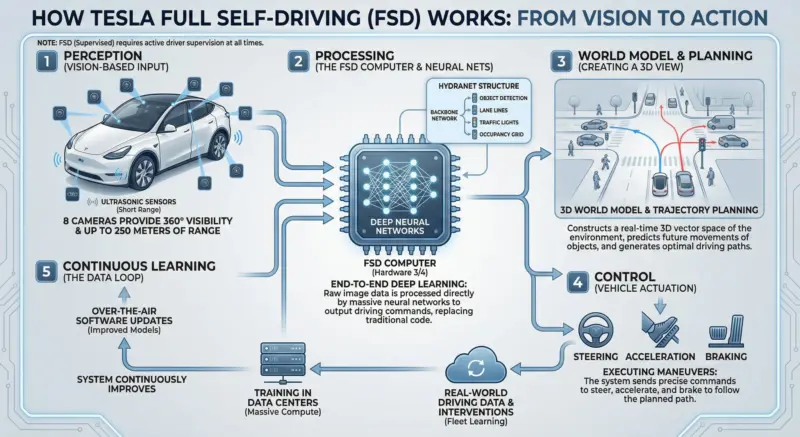
Creating professional-grade infographics used to require specialized design skills and hours of work. With the advent of Google’s Nano Banana Pro, the engine behind Gemini’s advanced image generation, that entire workflow has changed. Now, a single, well-crafted prompt can produce stunning and informative visuals in seconds.
At TipTinker, we’re always on the lookout for game-changing techniques, and a prompt shared by X user Ananto perfectly demonstrates this leap in AI capability. It’s deceptively simple but unlocks the full potential of Nano Banana Pro’s deep knowledge and text-rendering power.
The Power-Prompt for Complex Infographics
The magic of this prompt lies in its directness. It doesn’t over-specify design elements but instead trusts the AI’s “reasoning” capabilities to structure complex information visually.
Make an infographic that explains how Tesla FSD works
As Ananto wisely notes, “Only the Tesla AI team can verify its accuracy,” which is a critical reminder when using AI for factual content. Always treat AI-generated information, especially on technical topics, as a starting point for verification.
Step-by-Step Guide to Creating Your Infographic
Ready to try it yourself? It only takes a few clicks.
- Step 1: Open an AI tool powered by Nano Banana Pro. Your primary options are Gemini (using the “Thinking” model) or Google AI Studio.
- Step 2: Copy the prompt above and paste it directly into the chat or prompt box.
- Step 3: Customize the topic. Swap “Tesla FSD” with any complex subject you need to visualize. For example: “how a blockchain works,” “the process of photosynthesis,” or “the history of the internet.”
- Step 4: Generate & Refine. Let Nano Banana Pro work its magic. If the first result isn’t perfect, you can ask for modifications like “change the color scheme to blues and greens” or “make the text larger.”
[Image: A screenshot of the Nano Banana Pro interface in Gemini, showing the Tesla FSD prompt being entered.]
🚀 Pro-Tips for Better Infographics
To elevate your results from good to great, keep these best practices in mind.
| Do This 👍 | Not That 👎 |
|---|---|
| Specify the style: “Make a minimalist infographic…” | Be vague: “Make a nice picture…” |
| Provide data points: “…that includes sensor types.” | Assume the AI knows what to prioritize. |
| Iterate on the output: “Regenerate with a focus on…” | Accept the first draft if it’s not quite right. |
| Verify key facts: Fact-check all data and labels. | Trust the AI’s output as 100% accurate. |
Nano Banana Pro excels because it combines world knowledge with advanced image and text generation. By giving it a clear, high-level task, you allow it to use its full reasoning power to organize the information logically and create a visually coherent design.
Go ahead and integrate this powerful prompting technique into your workflow today. You’ll be amazed at how quickly you can transform complex data into compelling, easy-to-digest infographics.
📚 Further Reading & Resources
- Original X Post: Ananto’s post on X
- Official Tech Intro: Google’s Nano Banana Pro Blog
- Try it Here: Gemini or Google AI Studio