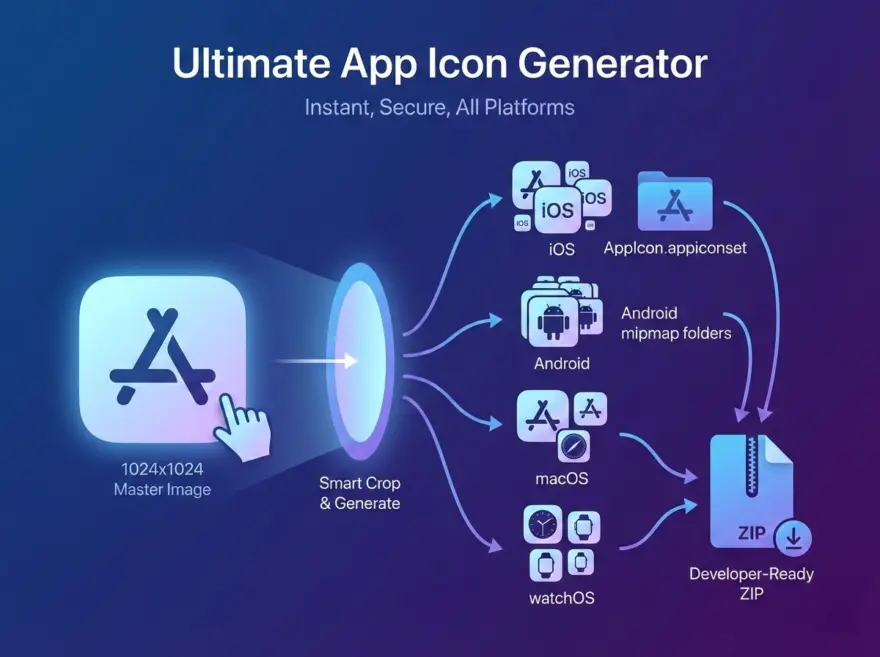
Preparing app icons for app stores and different operating systems is notoriously tedious. Our App Icon Generator takes a single master image (ideally 1024×1024) and instantly generates over 40 precisely scaled icons for iOS, macOS, watchOS, and Android.
It doesn’t just resize your images—it packages them into developer-ready folder structures, complete with Xcode Contents.json files and Android mipmap directories, inside a single downloadable ZIP file.
Why Use This App Icon Generator?
- Developer-Ready ZIP Export — Stop manually renaming files. We automatically generate an
AppIcon.appiconsetfolder for Xcode (with a pre-configuredContents.json) andres/mipmap-*folders for Android Studio. Just drag, drop, and code. - All Platforms at Once — Instantly output the required icon dimensions for iPhone, iPad, watchOS, macOS, and Android simultaneously.
- Built-in Smart Cropper — Not a perfect square? No problem. Use our built-in UI to frame and crop your image to a flawless 1:1 aspect ratio right in your browser.
- 100% Private & Secure — Your app’s assets are your business. All image processing, cropping, and ZIP compression happen entirely locally in your browser. No images are ever uploaded to our servers.
Supported Platforms & Files
This tool adheres strictly to the latest Apple Human Interface Guidelines and Google Material Design specifications:
- iOS & iPadOS: Generates all required sizes from 20pt to 1024pt (1x, 2x, 3x scales), neatly packaged into an
AppIcon.appiconsetdirectory. - macOS: Generates Mac-specific icons from 16×16 to 512×512 (@1x and @2x).
- watchOS: Covers all Apple Watch companion sizes.
- Android: Generates legacy and standard
ic_launchersizes (mdpi, hdpi, xhdpi, xxhdpi, xxxhdpi) plus the required 512×512 Google Play Store feature graphic.
How to Use the Generator
- Upload your master image: Drag and drop a high-resolution image (1024×1024 PNG or JPG is highly recommended).
- Crop to square: Use the popup interface to select the exact 1:1 framing for your icon.
- Generate: Click “Crop & Generate All.” The tool will render all 40+ variations in milliseconds.
- Download: Click Download All (.zip) to get your fully structured asset package, or download individual sizes from the visual grid below.
Perfect for Your Workflow
Whether you are an indie developer submitting your first app to the App Store, or a UI designer handing off assets to an engineering team, this tool eliminates the friction of asset generation. Drop your image in the box above to get started!
简体中文
多平台应用图标生成器
从单一来源图标生成适配多平台、多尺寸的应用图标资源。
한국어
멀티 플랫폼 앱 아이콘 생성기
단일 소스 이미지를 기반으로 다양한 플랫폼과 해상도에 맞는 앱 아이콘 세트를 생성합니다.
日本語
マルチプラットフォームアプリアイコンジェネレーター
1 つの元画像から、各プラットフォーム・各サイズに対応したアプリアイコンをまとめて生成します。