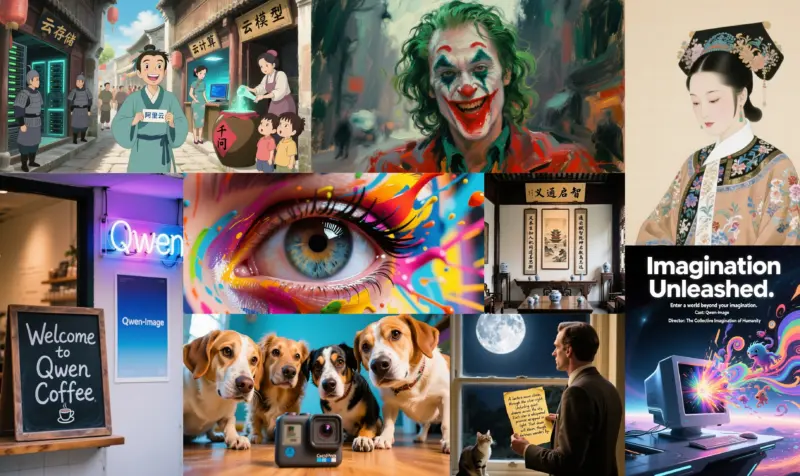
The landscape of AI image generation has long been dominated by names like Midjourney and Stable Diffusion. However, a massive contender has entered the arena from the creators of the Qwen Large Language Models (LLMs).
Qwen-Image is not just another image generator; it is a 20-billion parameter powerhouse designed to solve some of the most persistent pain points in AI art: consistent text rendering, precise instruction-based editing, and multi-image character consistency.
This guide will walk you through everything you need to know about the Qwen-Image ecosystem, including the base model, the editing pipeline, and the game-changing “2509” update.
What is Qwen-Image?
At its core, Qwen-Image is a foundation model built on a massive 20B parameter architecture. Unlike smaller models that struggle with complex prompts, Qwen-Image utilizes a “Modern Multi-modal Diffusion Transformer” (MMDiT) structure.
Key Features:
- Superior Text Rendering: Most AI models fail at spelling. Qwen-Image excels at generating accurate text within images, supporting both English and, notably, Chinese characters with high fidelity.
- Complex Composition: It follows intricate prompt instructions better than many open-source alternatives.
- Foundation for Editing: It serves as the backbone for the advanced editing features described below.
Explore the code: Qwen-Image GitHub | Hugging Face Model
The Editing Revolution: Qwen-Image-Edit
While generating images is fun, controlling them is where professional workflows happen. Qwen-Image-Edit is a specialized version designed for instruction-based editing.
Instead of complex in-painting masks, you simply provide an image and a text instruction like “Change the rabbit’s color to purple” or “Make it look like a sketch.”
Two Types of Editing:
- Semantic Editing: Changing the “meaning” of the image (e.g., turning a cat into a dog) while keeping the composition.
- Appearance Editing: Changing details (style, color, lighting) while keeping the subject identical.
Try the model: Qwen-Image-Edit on Hugging Face
The Game Changer: Qwen-Image-Edit-2509
Released as a major update, the 2509 version (referencing its release date) pushes the boundaries of consistency. If you are serious about AI workflows, this is the version you should use.
Why 2509 is Superior:
- Multi-Image Support: This is a killer feature. You can input multiple reference images (e.g., a person + a product) and the model will blend them intelligently. This is perfect for placing a specific character into different scenes.
- Identity Preservation: It drastically improves facial consistency, making it viable for creating consistent characters for comics or storyboards.
- Native ControlNet: It supports depth maps, edge detection, and pose control natively, giving you granular control over the output structure.
Get the latest version: Qwen-Image-Edit-2509
How to Use Qwen-Image (ComfyUI & Python)
You don’t need to be a coding wizard to use these models. The community has rapidly adopted them.
Method 1: ComfyUI (Recommended for Artists)
The most flexible way to run Qwen-Image is via ComfyUI, the node-based interface for Stable Diffusion.
- Download the model checkpoints (
.safetensors) from the Hugging Face links above. - Place them in your
ComfyUI/models/diffusion_modelsfolder. - Drag and drop the example workflow images from the official examples page into your ComfyUI window.
View ComfyUI Workflows: ComfyUI Examples for Qwen Image
Method 2: Python (For Developers)
You can run the model locally using the diffusers library.
from diffusers import QwenImageEditPlusPipeline
import torch

# Load the 2509 Pipeline
pipeline = QwenImageEditPlusPipeline.from_pretrained(
    "Qwen/Qwen-Image-Edit-2509",
    torch_dtype=torch.bfloat16
).to("cuda")

# Your editing logic here...
Qwen-Image represents a significant leap forward for open-weights AI models. Its ability to handle text correctly and its advanced “2509” editing capabilities make it a must-have tool for AI artists and developers. Whether you are creating consistent character assets or simply need an image generator that can actually spell, Qwen is ready for your workflow.