Easy Sitemap (WordPress Plugin)
A modern, high-performance HTML sitemap generator for WordPress.
Easy Sitemap allows you to display fully customizable sitemaps for Pages, Posts, and Custom Post Types (CPTs) using a powerful shortcode system. Built with a modern OOP architecture, it features intelligent caching, PSR-4 autoloading, and extensive hooks for developers.
✨ Key Features
🛠 For Site Builders
- Universal CPT Support: Automatically detects and supports all public post types (including WooCommerce Products, Portfolios, etc.).
- Visual Shortcode Generator: A built-in interactive builder in the admin panel to generate codes without memorizing attributes.
- Hierarchical Layouts: Displays parent/child relationships for pages and category groupings for posts.
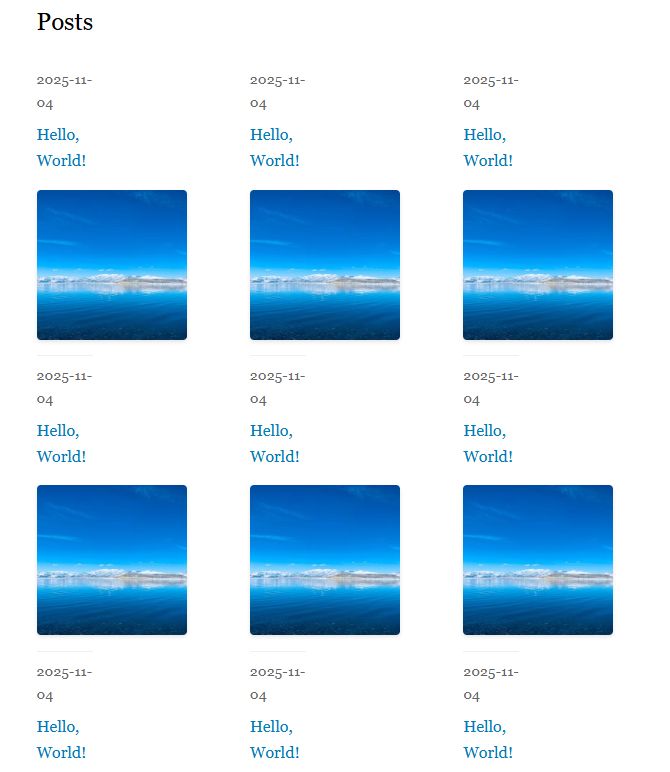
- Responsive Grid: Supports multi-column layouts (up to 6 columns) via CSS grid.
- Safe Custom Styling: Add custom CSS directly in the plugin settings without modifying your theme.
⚡ Performance & Tech
- Intelligent Caching: Uses WordPress Transients to cache output for guests while keeping content dynamic for logged-in users.
- Optimized Queries: utilizes
no_found_rowsand efficient database calls to minimize overhead. - Modern Architecture: Clean OOP design with PSR-4 autoloading.
- SEO Friendly: Generates semantic, structured HTML markup.
📋 Requirements
- WordPress: 5.0 or higher
- PHP: 7.2 or higher
- MySQL: 5.6 or higher
🚀 Installation
- Download: Extract the plugin files.
- Upload: Move the
easy-sitemapfolder to your server’s/wp-content/plugins/directory. - Activate: Navigate to WordPress Admin → Plugins and activate Easy Sitemap.
- Configure: Go to Settings → Easy Sitemap to adjust global settings or use the Shortcode Generator.
📖 Shortcode Usage
To display a sitemap, insert the [easy_sitemap] shortcode into any post, page, or widget.
The Shortcode Generator
Recommended: Instead of typing attributes manually, go to Settings → Easy Sitemap. The built-in generator allows you to toggle options via a UI and automatically copies the resulting shortcode to your clipboard.
Manual Attribute Reference
You can customize the output using the following attributes:
1. Content & Filtering
| Attribute | Type | Default | Description |
|---|---|---|---|
post_type |
string | post |
The post type to display (e.g., page, product, portfolio). |
limit |
int | 1000 |
Maximum number of items to display. |
include |
string | null | Comma-separated list of IDs to include (e.g., 10,15,22). |
exclude |
string | null | Comma-separated list of IDs to exclude. |
category |
string | null | Filter by category slugs (e.g., news,updates). |
tag |
string | null | Filter by tag slugs. |
author |
int | null | Filter by Author ID. |
date_from |
string | null | Start date (Format: YYYY-MM-DD). |
date_to |
string | null | End date (Format: YYYY-MM-DD). |
2. Advanced Taxonomy Filtering
To filter by custom taxonomies (e.g., WooCommerce Product Categories):
taxonomy: The taxonomy slug (e.g.,product_cat).term: The specific term slug (e.g.,accessories).- Note: Both attributes must be used together.
3. Sorting
| Attribute | Options | Default |
|---|---|---|
orderby |
date, title, modified, menu_order, rand, ID |
date |
order |
DESC (Descending), ASC (Ascending) |
DESC |
4. Display & Layout
| Attribute | Type | Default | Description |
|---|---|---|---|
show_dates |
bool | 0 |
Display publication date next to title. |
show_excerpts |
bool | 0 |
Display the post excerpt. |
show_images |
bool | 0 |
Display the featured image (thumbnail). |
hierarchical |
bool | 0 |
Show parent/child structure (Pages) or Category groupings (Posts). |
columns |
int | 1 |
Split list into columns (Max: 6). |
class |
string | null | Add a custom CSS class to the wrapper. |
5. Caching (Per Instance)
| Attribute | Description |
|---|---|
cache |
Set to 0 to disable caching for a specific shortcode (overrides global settings). |
cache_expiry |
Duration in seconds (Default: 3600). |
💡 Examples
Standard Blog List
[easy_sitemap post_type="post" show_dates="1" category="news"]
WooCommerce Product Grid
Displays 12 electronics products with images in a 3-column grid.
[easy_sitemap post_type="product" taxonomy="product_cat" term="electronics" show_images="1" columns="3" limit="12"]
Hierarchical Pages
Ideal for Table of Contents or site indices.
[easy_sitemap post_type="page" hierarchical="1" orderby="menu_order" order="ASC"]
Portfolio by Date Range
[easy_sitemap post_type="portfolio" date_from="2023-01-01" date_to="2023-12-31"]
⚙️ Configuration & Performance
Intelligent Caching
The plugin uses a smart caching system to ensure your site remains fast, even with large sitemaps.
- Global Settings: Configure caching in Settings → Easy Sitemap.
- Guest-Only Mode: Caching is only applied to non-logged-in users (guests). Logged-in administrators always see live data.
- Transients: Uses native WordPress transients.
- Auto-Clear: Cache automatically clears when the plugin is deactivated.
Custom Styling
You can style the sitemap using the Custom CSS box in the plugin settings.
Common Selectors:
/* Container */

.easy-sitemap { margin-bottom: 30px; }


/* List Items */

.easy-sitemap-item { border-bottom: 1px solid #eee; }


/* Images */

.easy-sitemap-image { border-radius: 4px; max-width: 80px; }


/* Dates */

.easy-sitemap-date { font-size: 0.85em; color: #888; }
👨💻 Developer Documentation
Architecture
The plugin follows strict PSR-4 standards with a separation of concerns between Admin, Frontend, and Core logic.
classes/

├── EasySitemap/

│   ├── Admin/          # Settings & UI

│   ├── Frontend/       # Shortcode Engine & Assets

│   ├── Autoloader.php

│   └── Plugin.php      # Bootstrap
Hooks & Filters
Modify behavior programmatically using the following filters:
1. Modify Query Arguments
Adjust the WP_Query arguments before the sitemap is fetched.
add_filter( 'easy_sitemap_query_args', function( $query_args, $atts ) {

    // Example: Force all sitemaps to exclude a specific category ID

    $query_args['category__not_in'] = [ 99 ];

    return $query_args;

}, 10, 2 );
2. Modify Output HTML
Filter the final HTML before it is rendered.
add_filter( 'easy_sitemap_output', function( $output, $atts, $posts ) {

    return '<div class="my-wrapper">' . $output . '</div>';

}, 10, 3 );
3. Change Image Size
Change the source image size (default is ‘thumbnail’).
add_filter( 'easy_sitemap_image_size', function( $size ) {

    return 'medium';

} );
4. Add Supported Post Types
Manually inject support for complex CPTs if auto-detection fails.
add_filter( 'easy_sitemap_supported_post_types', function( $post_types ) {

    $post_types['my_custom_type'] = 'My Custom Type';

    return $post_types;

} );
🐛 Troubleshooting
- Images not showing? Ensure the
show_images="1"attribute is present and that your theme supports post thumbnails. - Changes not appearing? If caching is enabled, wait for the expiry time (default 1 hour) or save the plugin settings page to flush the cache manually.
- Shortcode Generator issues? Ensure your browser allows clipboard access. If the “Copy” button fails, manually copy the text from the generator box.
📄 License & Credits
License: GNU General Public License v2.0 or later.
Made with ❤️ for the WordPress community.