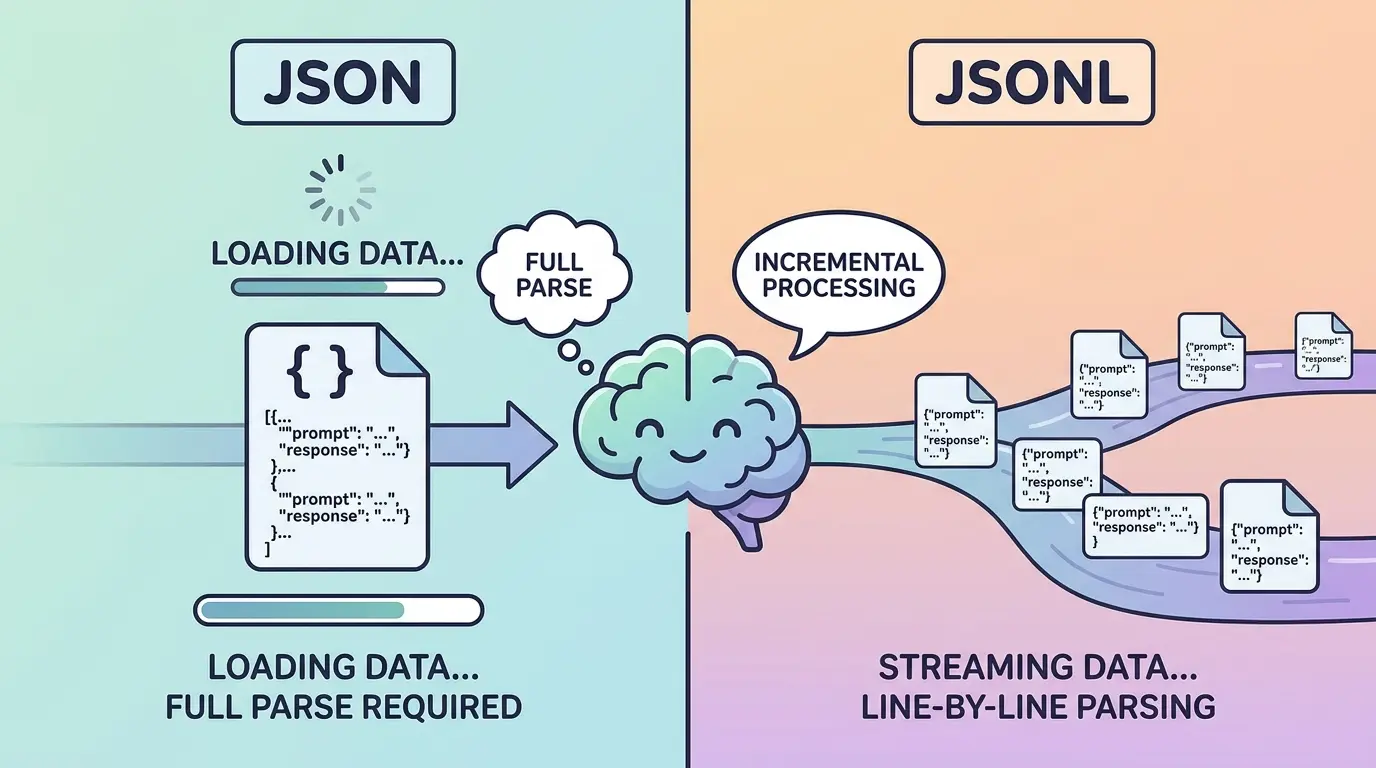
Most LLM dataset problems do not start with the model. They start with the file. A batch job fails because one record is malformed. A fine-tuning script expects one example per line. A conversion step has to reopen a huge array just to isolate one bad sample. That is the real bottleneck behind the JSON vs JSONL decision.
Whether you build datasets for ChatGPT, Gemini, Claude, or DeepSeek, the operational rule is the same: clean structure makes AI Prompts easier to validate, easier to stream, and easier to trust. The practical prompts below are built as a universal foundation for AI builders, data curators, and ML engineers choosing between JSON and JSONL for training sets, batch jobs, evaluations, and prompt libraries. Each model has different strengths, but the format choice should be driven by workflow reality rather than model preference.
JSON Vs JSONL At A Glance
JSON is one valid JSON document. That document might be a single object, a top-level array, or a deeply nested structure with shared metadata.
JSONL, also called JSON Lines, stores one valid JSON object per line. Every line stands on its own, which makes record-level processing much easier.
| Format | Best Fit | Strength | Main Weakness |
|---|---|---|---|
| JSON | Small structured datasets, nested configs, shared metadata, tightly coupled evaluation packs | Easy to treat as one coherent document | Harder to append, retry, shard, or lint record by record |
| JSONL | Fine-tuning examples, batch inference inputs, append-only logs, streaming pipelines | Easy to process one record at a time | Schema drift can hide across lines if you do not validate consistently |
If this format choice sits inside a broader data-prep workflow, TipTinker’s AI tools hub is a useful place to compare dataset cleanup and validation utilities.
Use JSON When The Dataset Must Behave Like One Structured Object
Plain JSON is the better fit when the file is meant to be read as one whole artifact. That usually means shared metadata at the top, nested collections with internal references, or evaluation packs where one section depends on another. A rubric set, a benchmark manifest, or a synthetic-data recipe file often fits this pattern.
The tradeoff is operational. JSON is convenient when humans or applications want one self-contained document. It is less convenient when you need line-level retries, incremental appends, or distributed workers processing independent records.
Model Recommendation: ChatGPT works well for quick day-to-day format decisions when you want a practical recommendation without overcomplicating the tradeoff.
You are helping me choose the right container format for an LLM dataset.

I will give you:
- the dataset schema
- whether records share top-level metadata
- whether records reference each other
- expected dataset size
- whether I need append-only writes, streaming, or partial retries

Decide whether plain JSON or JSONL is the better fit.

Return:
1. Recommended format
2. Why it fits this workflow
3. Why the other format is weaker here
4. Risks I should watch for
5. A minimal example structure

Workflow details:
[PASTE YOUR SCHEMA AND PIPELINE NOTES]
The Payoff: This prompt stops the common mistake of choosing JSONL just because it sounds more “LLM native.” If your dataset has heavy shared structure, plain JSON may be cleaner and easier to maintain.
Use JSONL When Each Example Must Stand On Its Own
JSONL is usually the stronger format when every example can be processed independently. That is why it shows up so often in fine-tuning files, batch API jobs, evaluation queues, and dataset sharding pipelines. One line fails, one line gets fixed. One record needs retrying, one record gets replayed.
This is the core difference: JSON optimizes for one document, while JSONL optimizes for one record at a time. If your pipeline needs streaming, append-only generation, multiprocessing, or easy diff review, JSONL usually wins.
Model Recommendation: DeepSeek is useful when the decision depends on operational logic such as retries, sharding, batch execution, and pipeline decomposition.
You are evaluating whether an LLM workflow should use JSON or JSONL.

Score the workflow against these dimensions:
- line-level validation
- append-only writes
- streaming or chunked processing
- partial retries
- parallel workers
- schema consistency across records
- human review of individual samples

Return:
1. Recommended format
2. Score table for each dimension
3. Operational reasons for the choice
4. Failure modes to expect
5. One small schema example in the recommended format

Workflow description:
[PASTE TRAINING, EVAL, OR BATCH PIPELINE DETAILS]
The Payoff: This prompt ties the format choice to how your system actually runs. That usually leads to a more stable answer than arguing from preference or habit.
Convert Between JSON And JSONL Without Corrupting Records
Conversion looks easy until the dataset contains nested messages, embedded newlines, role arrays, or escaped characters inside prompt fields. The risky part is not the syntax. The risky part is silent corruption, where the output still parses but no longer preserves the original training example.
When converting from JSON to JSONL, each output line should remain a complete, standalone record. When converting from JSONL back to JSON, you need to decide whether the target should be a top-level array or an object with metadata and a records field.
Model Recommendation: Claude is often the better fit for careful restructuring, schema preservation, and conversion instructions that need precise reasoning.
You are converting an LLM dataset between JSON and JSONL.

Task:
- preserve every field exactly
- keep Unicode content intact
- preserve escaped newlines inside string values
- keep message arrays and role labels unchanged
- detect records that are not safe to convert directly

Return:
1. Converted output
2. Records that need manual review
3. Any schema assumptions you made
4. A checklist I can use to verify nothing was corrupted

Source format:
[JSON OR JSONL]

Target format:
[JSON OR JSONL]

Dataset sample:
[PASTE SAMPLE DATA]
The Payoff: This prompt helps you avoid the worst kind of data issue: a dataset that looks valid but no longer says what you think it says.
Validate Every Record Before Training Or Batch Inference
Format choice alone does not make a dataset safe. A JSONL file can still fail because one line has a missing brace, a mixed field type, an invalid role label, or a prompt field that unexpectedly becomes an array. That is why line-by-line validation matters so much.
If you want a browser utility for this step, TipTinker’s JSONL Linter, Validator & LLM Dataset Formatter is a natural companion before upload or conversion.
Model Recommendation: DeepSeek works well for structured error decomposition when you need record-level diagnostics instead of generic parsing advice.
You are validating an LLM dataset file.

Check for:
- malformed JSON syntax
- invalid JSONL line structure
- missing required keys
- empty prompt, completion, or messages fields
- inconsistent field types across records
- invalid role names
- duplicate IDs
- records that are technically valid JSON but operationally unsafe

Return a table with:
1. Line number or record index
2. Error category
3. Exact field involved
4. Why it is broken
5. Safe correction
6. Whether the whole file can continue processing

Dataset schema:
[PASTE EXPECTED SCHEMA]

Dataset content:
[PASTE SAMPLE OR ERROR OUTPUT]
The Payoff: This prompt gives you a repair queue instead of a vague failure message. That becomes especially valuable when only a few records are blocking the whole job.
Audit Prompt Fields, Message Roles, And Leakage Before Upload
Even a perfectly formatted file can still be a weak LLM dataset. Prompt fields may contain placeholder text, duplicated system instructions, role confusion, private notes, or examples that teach the wrong pattern. Format correctness is only the first gate.
If the same corpus later feeds retrieval, chunking discipline still matters after the file is clean. TipTinker’s RAG Chunking Visualizer is useful when the next step is deciding how those records should be broken apart for downstream retrieval.
Model Recommendation: Claude is a strong fit for professional nuance, dataset hygiene review, and prompt-level quality checks that need careful judgment.
You are auditing an LLM dataset for prompt quality and instruction leakage.

Review the records for:
- duplicated system prompts
- prompt leakage into the wrong field
- inconsistent user / assistant / system roles
- hidden placeholder text
- accidental chain-of-thought targets
- private notes or comments that should not appear in training data
- records that teach the wrong response pattern

Return:
1. Record index
2. Severity: low / medium / high / critical
3. What is wrong
4. Why it damages training or evaluation quality
5. A corrected version of the record
6. Whether this is a format issue, a content issue, or both

Dataset sample:
[PASTE RECORDS]
The Payoff: This prompt catches the problems that syntax validators miss. A clean parse is not the same thing as a clean dataset.
Decide When JSONL Is Overkill
JSONL is popular because it fits many LLM workflows well, but it is not automatically superior. If the file is small, tightly nested, and always consumed as one artifact, JSON may remain simpler. That is often true for benchmark manifests, prompt libraries with shared metadata, or one-off evaluation packs passed through a single script.
The better question is not “Which format is more modern?” It is “At what granularity will this pipeline read, write, validate, retry, and review data?” If the answer is one record at a time, JSONL is usually right. If the answer is one document at a time, JSON may still be the better engineering choice.
Model Recommendation: Gemini works well when you need to synthesize multiple workflow notes, schemas, and downstream consumers before making the final call.
You are reviewing an LLM data pipeline to decide whether JSONL is necessary or whether plain JSON is simpler.

I will provide:
- dataset size
- consumer scripts
- upload target
- whether records are processed independently
- whether top-level metadata is shared
- whether retries happen at file level or record level

Return:
1. Final recommendation
2. Whether JSONL is necessary, useful, or overkill
3. Operational reasoning
4. Migration trigger points that would justify switching formats later
5. A simple implementation plan

Pipeline details:
[PASTE NOTES]
The Payoff: This prompt protects you from adding complexity without benefit. Sometimes the right move is to keep the dataset boring and easy to reason about.
Pro-Tip
Chain the work in this order: choose the format, convert a representative sample, validate record structure, then audit prompt quality. Use ChatGPT for fast day-to-day format decisions, Claude for careful schema and prompt review, Gemini when multiple workflow documents need to be synthesized, and DeepSeek when line-level validation logic gets technical.
The best LLM datasets are not only well written. They are easy to stream, inspect, retry, and trust. Once the file format matches the way your pipeline actually operates, every later step becomes easier to debug.