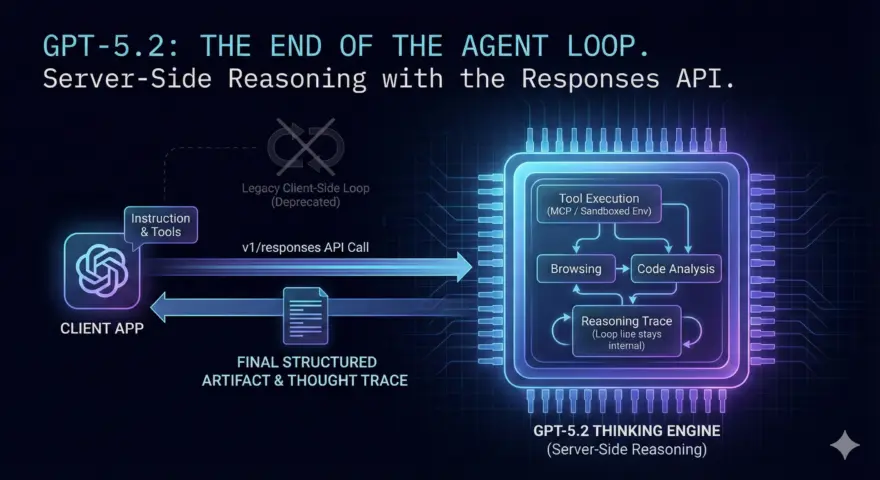
The era of writing manual while loops to force an LLM to act as an agent is over.
Yesterday, OpenAI released GPT-5.2 (comprising Instant, Thinking, and Pro variants) alongside the release of openai-python v2.11.0. While the benchmarks—55.6% on SWE-Bench Pro and 70.9% on GDPval—are impressive, the real breakthrough for engineers isn’t just the model weights. It’s the architecture shift.
The new Responses API (v1/responses) effectively deprecates the “Chat Completions” loop for complex tasks, moving the agentic orchestration (reasoning → tool use → observation → reasoning) entirely server-side.
Here is the technical breakdown of GPT-5.2 and how to implement the new Responses API today.
The Problem: The “Client-Side Loop” Bottleneck
For the past two years, building an agent meant acting as the middleman. You sent a prompt, the model returned a tool call, you executed the code, and sent the result back. This “Client-Side Loop” introduced latency, serialization errors, and context window fragmentation.
GPT-5.2 changes the topology. By integrating with the Model Context Protocol (MCP) and the new Responses API, the model handles the entire chain of thought and execution steps internally before returning the final artifact.
The Architecture Shift
The following diagram illustrates the migration from the traditional “Chat Completion” loop to the new “Responses” pipeline.
graph TD
    subgraph "Legacy (GPT-4 / GPT-5)"
        A1["Client"] -->|Prompt| B1["LLM"]
        B1 -->|Tool Call Request| A1
        A1 -->|Execute Code| A1
        A1 -->|Tool Output| B1
        B1 -->|Final Answer| A1
    end

    subgraph "GPT-5.2 Responses API"
        A2["Client"] -->|Instruction + Tools| B2["OpenAI Server"]
        B2 --> C2{"GPT-5.2 Thinking"}
        C2 -->|Internal Reasoning| C2
        C2 -->|Server-Side Tool Exec| D2["Sandboxed Env / MCP"]
        D2 -->|Observation| C2
        C2 -->|Final Response Object| A2
    end

    style B2 fill:#74a,stroke:#333,stroke-width:2px
    style C2 fill:#333,stroke:#fff,stroke-width:2px
Core Concepts
- GPT-5.2 Thinking: This variant (similar to the o-series reasoning models) uses test-time compute to “think” before outputting. Unlike previous iterations, it can pause to call tools during the thinking process without returning control to the client until the task is complete.
- Responses API (
v1/responses): A stateful endpoint that accepts aninstructionrather than just a list ofmessages. It returns a rich object containing the final output and a trace of the reasoning steps. - GDPval Benchmark: A new metric measuring “Gross Domestic Product value,” where GPT-5.2 Thinking achieved a 70.9% win rate against industry professionals in tasks like spreadsheet modeling and legal analysis.
The Code: Implementing v1/responses
To use GPT-5.2, you must upgrade to the latest library. The old ChatCompletion patterns still work but will not leverage the server-side agentic capabilities.
Prerequisites
- Python 3.9+
- OpenAI API Key with GPT-5.2 access (Tier 5+ developers).
pip install --upgrade openai
The “Research Agent” Script
This script demonstrates using the Responses client to perform a multi-step research task in a single request.
import os
from openai import OpenAI
from pydantic import BaseModel

# Ensure you have the latest client
client = OpenAI(api_key=os.getenv("OPENAI_API_KEY"))

# Define a structured output schema (The "Artifact")
class ResearchReport(BaseModel):
    title: str
    key_findings: list[str]
    confidence_score: float

def run_agent():
    print("Initializing GPT-5.2 Thinking Agent...")

    # The new 'responses' endpoint replaces chat.completions for agents
    try:
        response = client.responses.create(
            model="gpt-5.2-thinking",
            instruction=(
                "Analyze the latest benchmarks for 'Mamba-2' vs 'Transformer++' "
                "architectures. Check ArXiv and GitHub trending. "
                "Return a structured report."
            ),
            # Capability flags enable server-side tools automatically
            capabilities={
                "browser": "auto",  # Native browsing
                "analysis": "auto"  # Native code interpreter
            },
            # Enforcing structured output at the protocol level
            response_format=ResearchReport
        )

        # The response object contains the final artifact and the thought trace
        print(f"\n--- Reasoning Trace ({response.usage.reasoning_tokens} tokens) ---")
        for step in response.steps:
            if step.type == 'tool_call':
                print(f"🔧 Tool: {step.tool_name} -> {step.tool_args}")
            elif step.type == 'thought':
                print(f"🧠 Thought: {step.content[:100]}...")

        # Access the structured Pydantic model directly
        report = response.output
        print(f"\n--- Final Report: {report.title} ---")
        for finding in report.key_findings:
            print(f"- {finding}")
        print(f"Confidence: {report.confidence_score}")

    except Exception as e:
        print(f"Error: {e}")

if __name__ == "__main__":
    run_agent()
Step-by-Step Implementation Guide
Follow these steps to migrate your agentic workflows to the new architecture.
- Update Your Environment:
Runpip show openaito confirm you are on version 2.11.0 or higher. Older versions do not support theclient.responsesnamespace.- Source: OpenAI Python Release v2.11.0
- Select the Right Model Variant:
- Use
gpt-5.2-instantfor low-latency, chat-based tasks (customer support, simple extraction). - Use
gpt-5.2-thinkingfor complex, multi-step agentic workflows (coding, research, data analysis). - Source: Introducing GPT-5.2
- Use
- Refactor for the
ResponsesAPI:
Stop managingmessagesarrays manually. Switch to providing a high-levelinstructionand let the model manage the context window statefully.- Tip: The
capabilitiesdict allows you to toggle native tools (Browsing, Code Execution) without defining JSON schemas manually.
- Tip: The
- Connect Custom Data (MCP):
If you have internal APIs, wrap them using the Model Context Protocol. GPT-5.2 can now ingest MCP servers directly as tools, reducing the need for custom glue code.- Documentation: Databricks & OpenAI Responses API Integration
- Monitor GDPval Performance:
For enterprise applications, benchmark your output against the GDPval metrics provided in the system card. If your task involves “knowledge work” (spreadsheets, scheduling, compliance),gpt-5.2-thinkingis statistically likely to outperform human professionals.
Conclusion
GPT-5.2 is not just a “smarter” model; it is an architectural correction. By moving the reasoning loop server-side with the Responses API, OpenAI has effectively commoditized the complex “ReAct” loops that engineers have spent years building.
For developers, the focus shifts from orchestration (how to get the model to do X) to definition (defining the tools and schemas accurately).
Resources: