The most pervasive bottleneck in modern LLM engineering isn’t data acquisition—it’s the brutal physics of GPU memory and compute cycles. If you are a Senior AI Engineer attempting to fine-tune a 20B or 70B parameter model, you are intimately familiar with the dreaded CUDA Out of Memory error. Standard implementations of RLHF, DPO, or even basic Supervised Fine-Tuning (SFT) require maintaining massive optimizer states, gradient caches, and activations in VRAM. Until recently, solving this meant renting massive multi-node NVIDIA A100 or H100 clusters, manually writing custom Triton kernels, or aggressively quantizing your models to the point of severe degradation.
Enter Unsloth. Unsloth solves the VRAM and latency constraints at the lowest levels of the deep learning stack. By introducing custom mathematical kernels and bypassing inefficient PyTorch abstractions, Unsloth allows you to train open-source models up to 2x faster while consuming 70% to 80% less memory—with zero loss in accuracy.
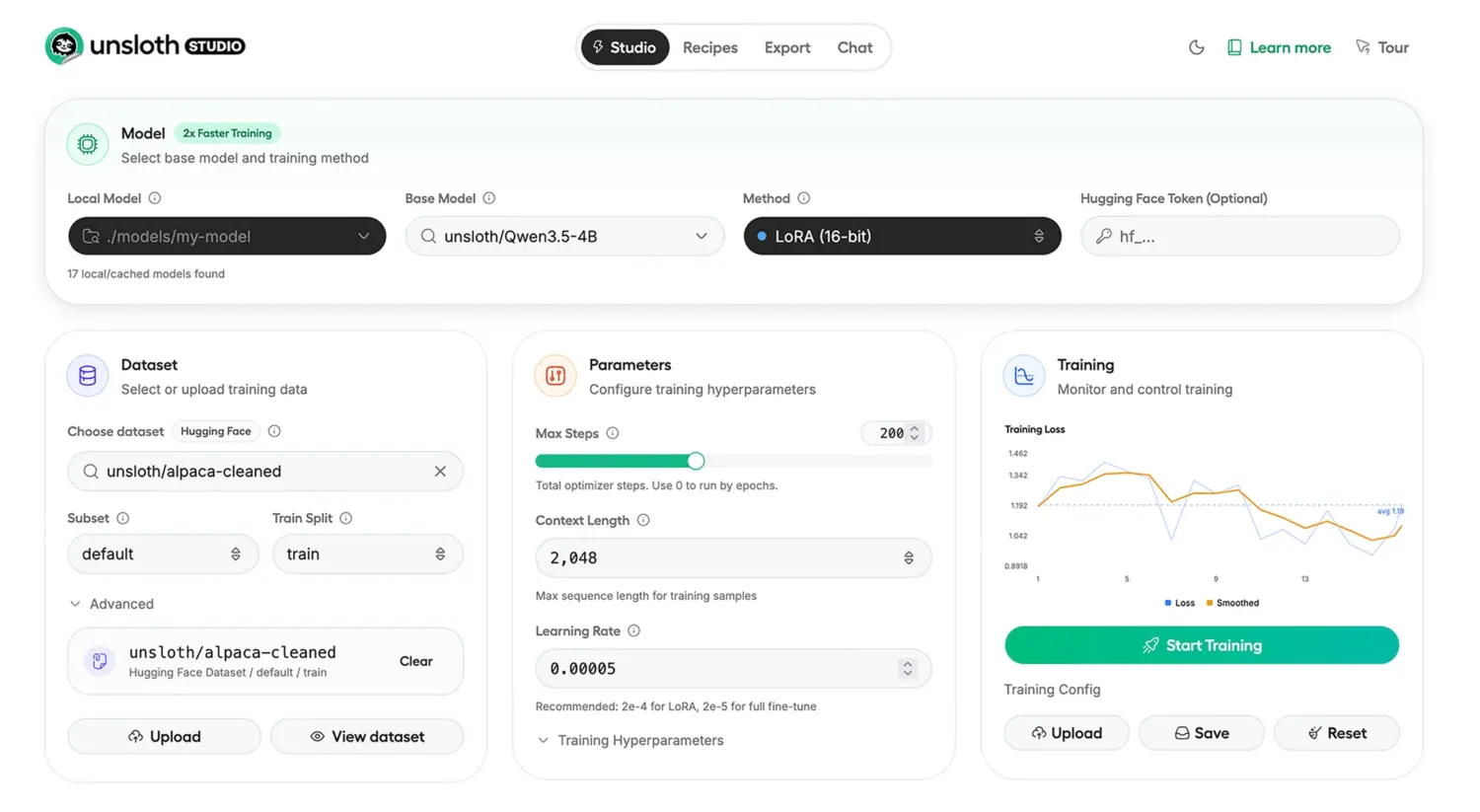
Now, with the release of Unsloth Studio, the Unsloth team has wrapped these low-level breakthroughs into an orchestrating web UI. It is an end-to-end, privacy-first local interface designed to handle data ingestion, rapid fine-tuning, observability, and direct GGUF exporting.
This technical deep-dive unpacks the architecture behind Unsloth’s kernel-level optimizations, provides empirical benchmarks, and guides you through a zero-fluff implementation of Unsloth Studio for your internal pipelines.
The Architectural Logic: How Unsloth Defeats the Memory Wall
Before deploying the tool, it is critical to understand why Unsloth fundamentally outperforms vanilla Hugging Face Transformers and PEFT libraries. The magic lies not in heuristics, but in aggressive, mathematically sound engineering at the kernel level.
1. Custom Triton Kernels for RoPE and MLPs
Most modern LLMs—such as Llama 3.2, Qwen 3.5, and Mistral—rely on Rotary Positional Embeddings (RoPE) and massive Multi-Layer Perceptrons (MLPs). In standard implementations, these operations allocate highly redundant memory buffers during the forward pass just to support the backward pass. Unsloth replaces these standard PyTorch implementations with hand-written Triton kernels. By fusing operations (e.g., fusing the RoPE calculation directly into the attention mechanism) and recomputing certain activations on-the-fly rather than caching them, Unsloth drastically reduces the peak VRAM footprint.
2. Padding-Free Packing and Flash Attention
Standard fine-tuning batches pad variable-length sequences to the length of the longest sequence in the batch. If you have one document that is 4,000 tokens and another that is 500 tokens, the shorter document is heavily padded, wasting compute cycles calculating attention over [PAD] tokens. Unsloth implements advanced padding-free sequence packing. Combined with optimized Flash Attention mechanisms, the model only computes attention over actual data. This yields a massive throughput increase, particularly in SFT tasks involving highly variable dataset lengths.
3. Hyper-Optimized Reinforcement Learning (GRPO & DPO)
Applying Reinforcement Learning via Group Relative Policy Optimization (GRPO) or Direct Preference Optimization (DPO) historically required maintaining an active model, a reference model, a reward model, and a value model in memory simultaneously. Unsloth’s memory routing eliminates redundant weights. Their optimized GRPO implementation uses up to 80% less VRAM, making it possible to run massive context RL pipelines (up to 500K context lengths) on single 80GB consumer GPUs.
4. Quantization-Aware Optimization (FP8, 4-bit, 16-bit)
Unsloth natively integrates BitsAndBytes for QLoRA, but pushes the boundary further with native FP8 (8-bit floating point) training. By maintaining higher precision only where mathematically necessary (like the LoRA adapters and optimizer states) and compressing the frozen base weights to exactly match the GPU’s optimal tensor core formats, Unsloth prevents quantization degradation while accelerating matrix multiplications.
Introducing Unsloth Studio: The Orchestration Layer
While Unsloth Core is brilliant for engineers who want to live in the terminal, managing datasets, monitoring loss curves, and testing inference loops can become fragmented. Unsloth Studio is the newly released GUI orchestrator designed specifically to bridge the gap between dataset engineering and low-level kernel execution.
Key Features of Unsloth Studio
- Data Recipes powered by NVIDIA NeMo: Data curation is notoriously tedious. Unsloth Studio incorporates a visual graph-node workflow for “Data Recipes.” Powered by NVIDIA NeMo Data Designer, this engine automatically processes unstructured PDFs, CSVs, JSON, and DOCX files into high-quality synthetic instruction-tuning datasets.
- Self-Healing Tool Calling and Code Execution: The Studio inference engine is not a simple chatbox. It allows LLMs to run Bash and Python in sandboxed environments (similar to Claude Artifacts). Crucially, it supports self-healing—if the model writes broken Python code, the execution engine returns the stack trace, allowing the model to correct its logic within a single inference thought-trace.
- Observability and Real-Time Telemetry: The dashboard tracks training loss, gradient norms, and multi-GPU utilization in real time. Because the UI is decoupled from the underlying engine, you can monitor remote training rigs from your local machine.
- 1-Click GGUF Export: Once fine-tuning concludes, the Studio automatically merges the LoRA adapters and exports the quantized model to GGUF or 16-bit safetensors, immediately ready for inference on llama.cpp, vLLM, or Ollama.
- Model Arena A/B Testing: The UI includes a native “Model Arena” where you can load your newly fine-tuned model side-by-side with the base model, providing real-time comparative inference testing on edge cases.
Unsloth Benchmark Metrics
The performance gains of Unsloth are not theoretical. Below is a comparative benchmark table of Unsloth’s performance scaling across state-of-the-art models. Notice the drastic VRAM reduction, which fundamentally lowers the hardware floor required for enterprise-grade training.
| Model Architecture | Task / Setup | Performance Gain | VRAM Reduction |
|---|---|---|---|
| Qwen 3.5 (4B) | Standard SFT | 1.5x faster | 60% less |
| gpt-oss (20B) | Standard SFT | 2x faster | 70% less |
| gpt-oss (20B) | GRPO Pipeline | 2x faster | 80% less |
| Qwen 3 | Advanced GRPO | 2x faster | 70% less |
| Gemma 3 (4B) | Vision SFT | 1.7x faster | 60% less |
| Llama 3.1 (8B) | Alpaca Dataset | 2x faster | 70% less |
| Mistral Ministral 3 | SFT | 1.5x faster | 60% less |
| Orpheus-TTS (3B) | Audio/TTS | 1.5x faster | 50% less |
| Embedding Gemma | Embedding Tuning | 2x faster | 20% less |
Implementation Steps: Deploying Unsloth Studio
Deploying Unsloth requires managing CUDA environments, Python versions, and specific dependencies. Unsloth Studio abstracts the worst of this, but as an engineer, it is essential to follow deterministic installation protocols to avoid library conflicts.
Here is the exact pipeline for standing up Unsloth Studio on a Linux machine with NVIDIA GPUs.
Step 1: Install UV and Python 3.13
Unsloth relies heavily on robust dependency resolution. Using standard pip can lead to notoriously long resolving times. The recommended path is to use Astral’s uv, an ultra-fast Python package installer written in Rust.
Action: Open your terminal and execute the following to install uv and create an isolated Python 3.13 virtual environment.
curl -LsSf https://astral.sh/uv/install.sh | sh
uv venv unsloth_studio --python 3.13
source unsloth_studio/bin/activate
Step 2: Install Unsloth Core and PyTorch Backends
Next, you must install the Unsloth python package. By passing the --torch-backend=auto flag, Unsloth will auto-detect your CUDA version and hardware architecture (e.g., Ampere, Hopper, Blackwell) and install the heavily optimized Triton binaries specifically compiled for your architecture.
Action: Execute the core installation.
uv pip install unsloth --torch-backend=auto
Step 3: Setup and Launch Unsloth Studio
Once the core library is installed, you must initialize the Studio components. This step will download the necessary llama.cpp precompiled binaries and UI web assets. Be aware that the first launch might take a few minutes as it compiles necessary C++ bindings.
Action: Run the setup and bind the Studio to your local network interface.
unsloth studio setup
unsloth studio -H 0.0.0.0 -p 8888
Note for Windows Users: You can achieve the same by using irm https://unsloth.ai/install.ps1 | iex in PowerShell, followed by launching .\unsloth_studio\Scripts\unsloth.exe studio -H 0.0.0.0 -p 8888.
Step 4: (Alternative) Docker Deployment
If you manage infrastructure via containerization, Unsloth provides an official Docker image. This is highly recommended for multi-tenant GPU clusters to avoid CUDA driver pollution.
Action: Run the Unsloth Docker container, exposing the necessary Jupyter and Studio ports, while passing through all available GPUs.
docker run -d -e JUPYTER_PASSWORD="mypassword" \
  -p 8888:8888 -p 8000:8000 -p 2222:22 \
  -v $(pwd)/work:/workspace/work \
  --gpus all \
  unsloth/unsloth
Step 5: Pipeline Data via Unsloth Studio UI
Navigate to http://localhost:8888 in your browser. You are now inside the Unsloth Studio orchestrator.
Action: Click on Data Recipes. Upload your unstructured internal wikis or JSONL conversational logs. Use the visual graph builder to map your data into a structured system prompt/user/assistant taxonomy. The backend will parse the documents utilizing the NeMo Data Designer pipeline, automatically cleaning malformed characters and standardizing token structures.
Step 6: Configure Kernel and Training Parameters
Navigate to the Training tab. Instead of writing PyTorch TrainingArguments manually, you can upload a YAML configuration or use the UI.
Action: Select your target base model (e.g., unsloth/Qwen-3.5-7B-Instruct). Set your quantization level to 4-bit for optimal memory savings. Crucially, ensure the “Unsloth Kernel Optimizations” toggle is Active. Adjust your LoRA Rank (e.g., r=16) and Alpha. Hit Start Training. You can now monitor the real-time loss graph in the Observability tab.
Step 7: Test Inference and Export to GGUF
Once the epochs are complete, do not immediately deploy to production.
Action: Move to the Model Arena tab. Load your newly generated LoRA checkpoint alongside the base model. Write a highly specific domain prompt. Because Unsloth Studio supports sandboxed code execution, you can instruct the model to write and execute a Python script to solve a data problem right in the UI. If the fine-tuned model succeeds where the base model hallucinated, proceed to the Export tab and package your model as a localized GGUF file for edge deployment.
The engineering overhead required to train state-of-the-art LLMs has historically gated open-source AI behind massive corporate budgets. By systematically restructuring how PyTorch handles matrix multiplications, gradients, and attention memory, Unsloth has democratized the model-tuning layer.
The addition of Unsloth Studio elevates this from a fragmented collection of Python scripts to an enterprise-ready pipeline. By leveraging custom Triton kernels, auto-padding truncation, and native GGUF exports within a cohesive local UI, teams can now achieve 2x training speeds while bypassing the VRAM limits of consumer and prosumer GPUs. Whether you are fine-tuning a small embedding model or running complex GRPO on a 20B reasoning model, Unsloth is no longer optional—it is a critical infrastructural requirement for modern AI engineering.