Image Preloading (WordPress Plugin)
A modern, high-performance plugin to optimize page load speeds through intelligent image prefetching.
This plugin allows you to preload critical images using modern JavaScript promises or standard HTML link headers. It is designed to be lightweight, developer-friendly, and fully integrated with the WordPress ecosystem.
✨ Key Features
- Dual Preloading Methods: Choose between JavaScript preloading, HTML
<link rel="preload">headers, or combine both for maximum compatibility. - Performance First: Utilizes
requestIdleCallbackto respect browser resources and main-thread activity. - Smart Conditional Logic: Granular control over where scripts load (e.g., specific post types, archives) and ID-based page exclusion.
- Robust Architecture: Promise-based loading with concurrency control, error handling, and input sanitization.
- Seamless Integration: Native WordPress Admin interface, translation-ready, and automatic migration for older versions.
📋 Requirements
| Component | Minimum Version |
|---|---|
| WordPress | 5.0+ |
| PHP | 7.2+ |
| MySQL | 5.6+ |
🚀 Quick Start Guide
Installation
- Download the plugin package.
- Upload the
image-preloadingfolder to your server’swp-content/plugins/directory. - Log in to WordPress and navigate to Plugins.
- Locate Image Preloading and click Activate.
Basic Configuration
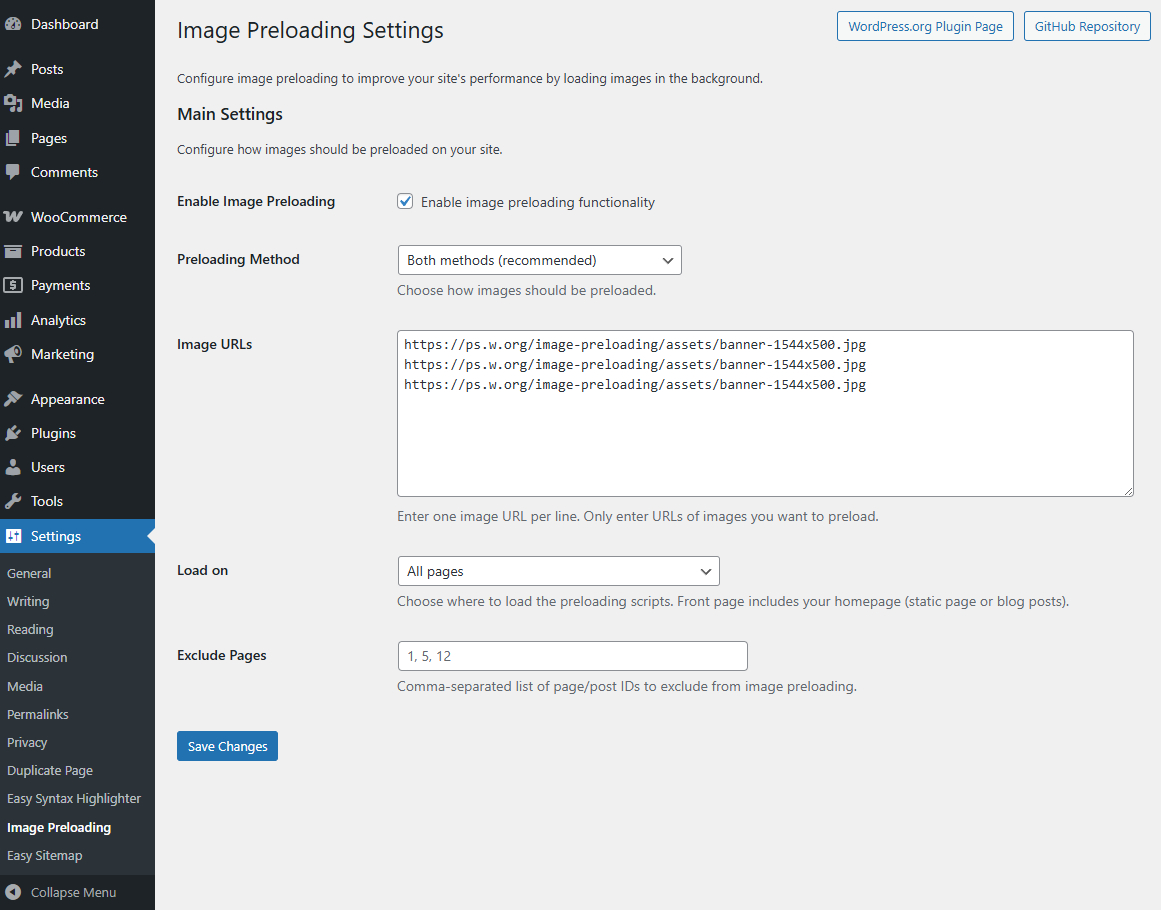
- Navigate to Settings → Image Preloading.
- Enable the plugin using the main toggle.
- Paste the full URLs of the images you wish to preload into the Image URLs box (one per line).
- Select your Preloading Method (Recommended: Both).
- Click Save Changes.
⚙️ Configuration Options
1. Preloading Methods
Select the strategy that best fits your performance needs:
- JavaScript (JS): Uses modern Promises to load images. Features error handling and concurrency limits. Best for dynamic loading control.
- Link Preload (Header): Injects standard
<link rel="preload">tags into the document<head>. This is the fastest method for modern browsers to discover critical assets early. - Both (Recommended): Combines both approaches to ensure high performance on modern browsers while maintaining a JavaScript fallback and verification system.
2. URL Management
Enter absolute URLs for your images. You may use external domains (CDNs).
Format Example:
/assets/image/logo.png

https://example.com/assets/hero-banner.jpg

/assets/image/campaign-graphic.webp
3. Conditional Loading
Control exactly where the preloader runs to avoid wasting bandwidth on irrelevant pages.
Load On:
- All Pages: (Default) Runs everywhere.
- Front Page: Only the homepage.
- Blog Posts Page: The main feed of latest posts.
- Single Posts / Pages / Archives: Target specific content types.
- Exclude Pages: Enter a comma-separated list of Page or Post IDs to strictly disable preloading on those specific URLs.
- Example:
5, 12, 104
🐛 Troubleshooting
Images Are Not Preloading
- Verify URLs: Ensure all links are direct image paths and accessible publicly.
- Check Method: If using “Link Preload,” view your page source (Ctrl+U) and search for
<link rel="preload">. - CORS: If loading from an external CDN, ensure the CDN sends correct Cross-Origin Resource Sharing (CORS) headers.
- Cache: Clear all WordPress, Server, and Browser caches after saving settings.
Performance & Console Errors
- Debugging: The plugin logs activity to the browser console.
- Open Developer Tools (F12).
- Filter for
[Image Preloading]. - Review success/failure messages.
- Concurrency: If the browser stalls, the plugin usually handles this via concurrency limits. If issues persist, reduce the number of images being preloaded.
Settings Not Saving
- Permissions: Verify your user account has administrator privileges.
- Migration: If you upgraded from v1.x, check admin notices. The plugin automatically attempts to migrate old settings formats.
🏗️ For Developers
Architecture
The plugin follows a clean, object-oriented structure using the Singleton pattern.
image-preloading/

├── image-preloading.php        # Main entry, class definition, singleton

│   ├── Image_Preloading_Plugin # Core Class

│   │   ├── load_options()      # Settings & Migration logic

│   │   ├── register_settings() # WP Settings API

│   │   └── should_load_scripts() # Logic for conditional display

├── /assets/

│   └── js/

│       └── image-preloading.js # Promise-based JS preloader

├── languages/                  # .pot and .po/.mo files

└── README.md
Internationalization
- Text Domain:
image-preloading - Location:
languages/ - All admin and frontend strings are fully translatable.
📄 License & Contributing
License: GNU General Public License v2.0 or later.