RAG Chunking Visualizer
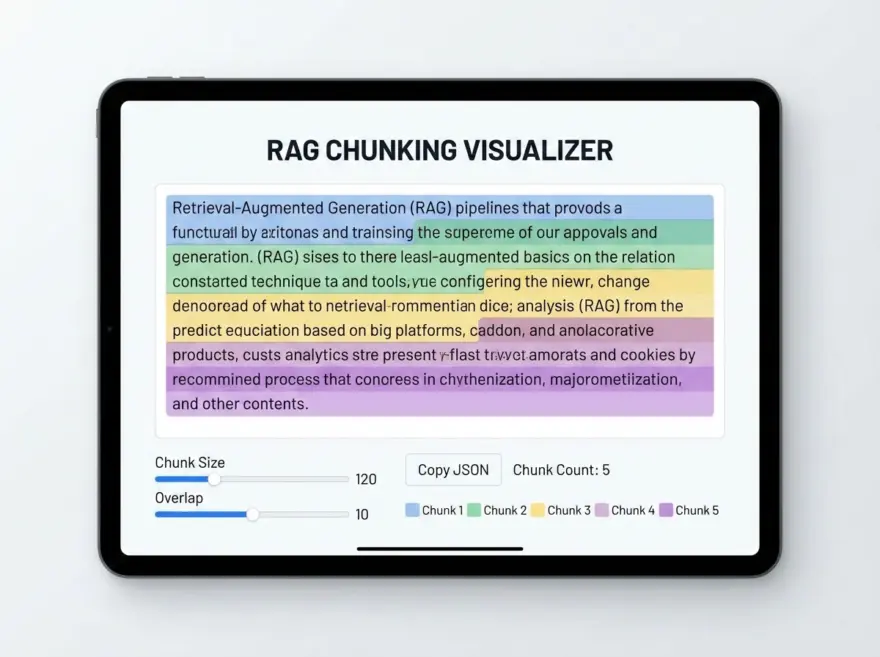
A free RAG text chunking visualizer that shows how long text is split into overlapping chunks. Set chunk size and overlap (in characters), then see the same text highlighted by chunk with alternating colors. Copy the full text or export chunks as a JSON array. Runs entirely in your browser. No server required. Useful when building retrieval-augmented generation (RAG) pipelines and tuning chunk size and overlap.
Why Use This RAG Chunking Tool?
- Visual: See exactly where each chunk starts and ends and how overlap works.
- Tunable: Adjust chunk size and overlap and update the view immediately.
- Export: Copy the full text or copy chunks as a JSON array for use in your app.
- Private: All processing happens in your browser.
Key Features
- Chunk size and overlap: Set character-based chunk size and overlap; the tool uses a sliding window (step = size − overlap).
- Color highlight: Up to four alternating background colors so you can see chunk boundaries.
- Chunk count: Displays how many chunks were produced.
- Copy full text / Copy as JSON array: Copy the original text or an array of chunk strings.
How it Works
The tool splits the input string into segments using a sliding window: each chunk has length “chunk size”; the next chunk starts “chunk size − overlap” characters after the start of the previous one, so consecutive chunks overlap by “overlap” characters. Each segment is wrapped in a span with a class that applies one of four background colors. The JSON array is the list of chunk strings in order.
Try the RAG Chunking Visualizer
Paste your text and set chunk size and overlap; the highlighted chunks update as you type or change the values. Use the legend to match colors to chunk order and the copy buttons to get the full text or the JSON array of chunks.