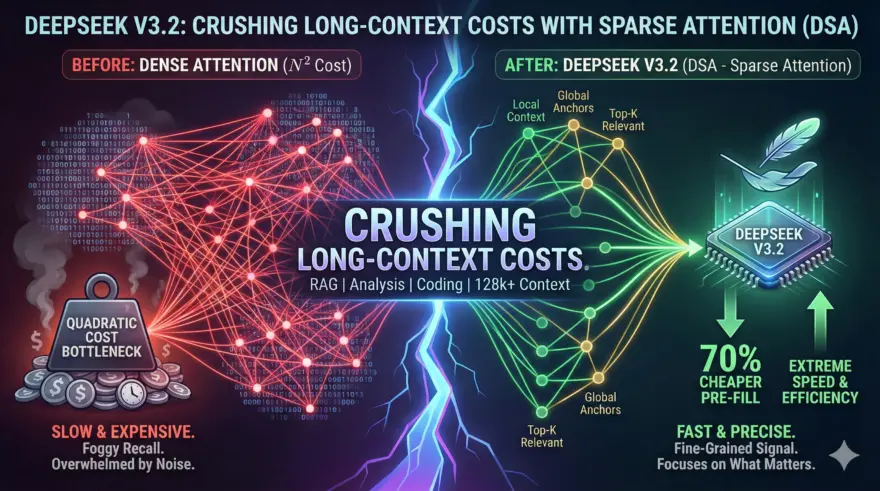
Long-context AI just got faster and significantly cheaper.
The release of DeepSeek-V3.2 (Dec 1, 2025) marks a pivotal shift in how Large Language Models handle massive datasets. While DeepSeek-V3 introduced Multi-Head Latent Attention (MLA) to compress memory usage, V3.2 attacks the computational bottleneck directly.
The secret? DeepSeek Sparse Attention (DSA).
If you are building RAG pipelines, analyzing 100-page reports, or debugging widespread codebases, the “quadratic cost” of attention has been your enemy. DeepSeek-V3.2 eliminates this by dynamically selecting only the most relevant tokens to process, dropping pre-fill costs by ~70% compared to its predecessors.
Here is how DSA works and how to deploy it immediately.
The Core Concept: DeepSeek Sparse Attention (DSA)
To understand DSA, we must look at the problem it solves: Dense Attention.
In standard transformers (like Llama 3 or GPT-4), every token attends to every other token. If you have a 128k context window, the calculation complexity is quadratic ($N^2$). As context grows, speed plummets and compute costs explode.
DeepSeek Sparse Attention (DSA) changes the math. Instead of a dense “all-to-all” matrix, it uses a Lightning Indexer. This mechanism dynamically identifies:
- Local Context: Tokens immediately surrounding the current word (standard sliding window).
- Global Anchors: Critical tokens (like section headers) that must always be visible.
- Dynamic Top-K: The most relevant “distant” tokens based on semantic similarity.
The result is Fine-Grained Sparsity. The model ignores the noise and focuses only on the signal, delivering extreme efficiency without the “foggy” recall typical of earlier sparse models.
Visualizing DSA Efficiency
graph TD
    style A fill:#000,stroke:#fff,color:#fff
    style B fill:#333,stroke:#fff,color:#fff
    style C fill:#000,stroke:#fff,color:#fff
    style D fill:#333,stroke:#fff,color:#fff
    style E fill:#000,stroke:#fff,color:#fff

    A["Input Sequence (100k+ Tokens)"] --> B["DSA Lightning Indexer"]
    B -- "Dynamic Query" --> C["Identify Top-K Relevant Blocks"]
    B -- "Fixed Pattern" --> D["Retain Local & Global Tokens"]
    C --> E["Sparse Computation (Linear-ish Cost)"]
    D --> E
    E --> F["High-Fidelity Output"]

    style F fill:#000,stroke:#fff,color:#fff
The Code: Running DeepSeek-V3.2
DeepSeek-V3.2 is optimized for the Hugging Face ecosystem. Below is the Python implementation using transformers to leverage the new attention mechanism.
Note: Ensure your transformers library is updated to v4.49+ to support the DSA kernels.
import torch
from transformers import AutoTokenizer, AutoModelForCausalLM

# 1. Initialize the Model (Use 'DeepSeek-V3.2-Speciale' for complex reasoning)
model_id = "deepseek-ai/DeepSeek-V3.2"

tokenizer = AutoTokenizer.from_pretrained(model_id)
model = AutoModelForCausalLM.from_pretrained(
    model_id,
    torch_dtype=torch.bfloat16,
    device_map="auto",
    trust_remote_code=True # Required for DSA custom kernels
)

# 2. Prepare Long-Context Input
# DSA shines when context > 32k tokens.
system_prompt = "Analyze the following technical documentation and identify breaking changes."
long_context_input = "..." * 10000  # Simulating large input

messages = [
    {"role": "system", "content": system_prompt},
    {"role": "user", "content": long_context_input}
]

# 3. Apply the Chat Template
input_tensor = tokenizer.apply_chat_template(
    messages,
    add_generation_prompt=True,
    return_tensors="pt"
).to(model.device)

# 4. Generate with Sparsity
outputs = model.generate(
    input_tensor,
    max_new_tokens=512,
    temperature=0.7
)

print(tokenizer.decode(outputs[0][input_tensor.shape[1]:], skip_special_tokens=True))
Step-by-Step Implementation Guide
Follow these steps to integrate DeepSeek-V3.2 into your workflow:
- Upgrade Environment: DSA requires specific CUDA kernels found in the latest libraries. Run
pip install --upgrade transformers accelerateand ensure FlashAttention-2 is installed if you are on NVIDIA GPUs. - Select Your Variant:
- DeepSeek-V3.2: The “daily driver.” Best for general tasks, RAG, and summarization. Low cost.
- DeepSeek-V3.2-Speciale: The reasoning powerhouse. Use this for math, complex logic, or coding agents. Note: Speciale is currently API-only or high-VRAM local deployment.
- Enable “Thinking Mode”: V3.2 integrates “Chain of Thought” directly into tool use. In your API calls or local generation config, ensure you parse the
<thinking>tags if you want to see the model’s reasoning process before the final answer. - Optimize Context Window: While the model supports 128k context, the sweet spot for DSA performance/cost ratio is typically between 32k and 96k tokens.
DeepSeek-V3.2 proves that we don’t need infinite compute to handle infinite context. By moving from brute-force dense attention to intelligent sparse attention, we can build agents that “read” entire libraries without breaking the bank.
Resources: