Google’s “Reasoning” Image Engine is finally here. Here is how to control it.
You might know it as Nano Banana Pro. Google officially calls it Gemini 3 Pro Image. But whatever name you use, the landscape of AI image generation shifted tectonically in November 2025.
For years, we’ve been forcing “diffusion” models (like Stable Diffusion or Midjourney) to guess what we want. We pray to the RNG gods, reroll 50 times, and hope for the best. Nano Banana Pro is different. It is the world’s first Reasoning Image Engine.
It doesn’t just “dream” your image; it plans it.
This guide cuts through the viral hype (and the funny codename) to show you exactly how to use Google’s new flagship model to generate 4K, text-perfect, logically consistent visuals.
The Core Concept: “Thinking” Pixels
Why did a model nicknamed “Nano Banana” top the LMSYS leaderboards anonymously? Because it solved the two biggest headaches in AI art: Text Rendering and Complex Logic.
Traditional models work like a reflex: Input Prompt $\rightarrow$ Output Pixels.
Nano Banana Pro works like an artist: Input Prompt $\rightarrow$ Reasoning Phase $\rightarrow$ Layout Planning $\rightarrow$ Output Pixels.
It uses the Chain-of-Thought (CoT) reasoning found in LLMs to understand relationships before it starts painting. If you ask for “a cat under a table behind a red ball,” it maps the 3D space first.
The Reasoning Loop
Here is how the “Thinking Mode” operates under the hood:
graph TD
    A["User Prompt"] --> B["Reasoning Engine (Gemini 3 Core)"]
    B --> C["Semantic Layout & 3D Spatial Planning"]
    C --> D["Text & Label Verification"]
    D --> E["High-Fidelity Diffusion Render"]
    E --> F["Final 4K Output"]
The Prompt: Activating The Reasoning Engine
To get the most out of Nano Banana Pro, you need to prompt it differently. Don’t just describe the visual; describe the logic.
The model excels when you ask it to “think” about the composition.
Use Case: Technical Diagrams & Infographics
This is the killer feature. It can render perfect text in multiple languages.
"Create a cross-section infographic of a modern espresso machine.
REASONING STEP: First, identify the water flow path from the reservoir to the group head. Plan the placement of the boiler, pump, and portafilter to ensure mechanical accuracy.
VISUALS: Render in a clean, vector-art style with a matte finish.
LABELS: Clearly label the following parts with callout lines in bold Helvetica font: 'Water Reservoir', 'Boiler', 'Pump', 'Group Head', 'Portafilter'.
Ensure no text overlaps."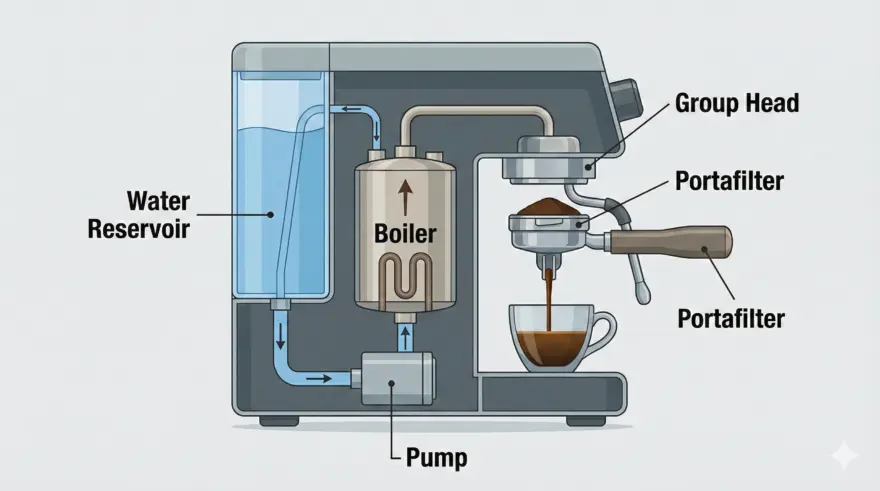
Step-by-Step: How to Access & Use It
As of December 2025, the model is available via Google AI Studio and Gemini Advanced.
- Access the Lab: Go to Google AI Studio or open your Gemini Advanced app.
- Select the Model: Look for the dropdown menu. You will likely see
Gemini 3 Pro Image(the official name). If you are using the API, the flag isgemini-3-pro-image-preview. - Enable Grounding (Optional): Toggle “Grounding with Google Search” if you want the image to reflect real-time data (e.g., “A chart showing Apple’s stock price trend for the last 5 days”).
- Input Your Prompt: Paste the structured prompt from the section above.
- Iterate with Conversation: Unlike Midjourney, you can talk to it. “Make the blue hair slightly darker” or “Fix the spelling on the label ‘Boiler’.”
Pro-Tips for Power Users
- The “Grounding” Hack: Need an image of a specific, real-world product that just launched? Don’t describe it. Enable Search Grounding and say: “Generate a promotional shot of the new [Product Name] based on its official specs found online.” The model will look up the product design and render it accurately.
- Text Rendering: If the model struggles with a specific word, put it in quotes and capitalize it in your prompt (e.g., “the sign says ‘OPEN'”). Nano Banana Pro has a near 99% accuracy rate for quoted text.
- Multi-Image Fusion: You can upload up to 14 reference images. Use this for “Style Transfer” on steroids. Upload 10 images of a specific comic book style and 1 image of a subject, then ask it to merge them.
- Aspect Ratio Freedom: You aren’t locked to 1:1. You can request specific pixel dimensions (e.g., “Generate in 1920×1080”).
“Nano Banana” might have started as a funny codename in a chatbot arena, but it has matured into the most precise image engine on the market. It moves us from “Prompt and Pray” to “Prompt and Plan.”
If you work in marketing, design, or education, the ability to render perfect text and logically consistent scenes is not just a feature—it’s a requirement.
Try this today: Open Gemini Advanced and ask it to design a business card for you with your actual name and title. The fact that it spells your name right on the first try will tell you everything you need to know.