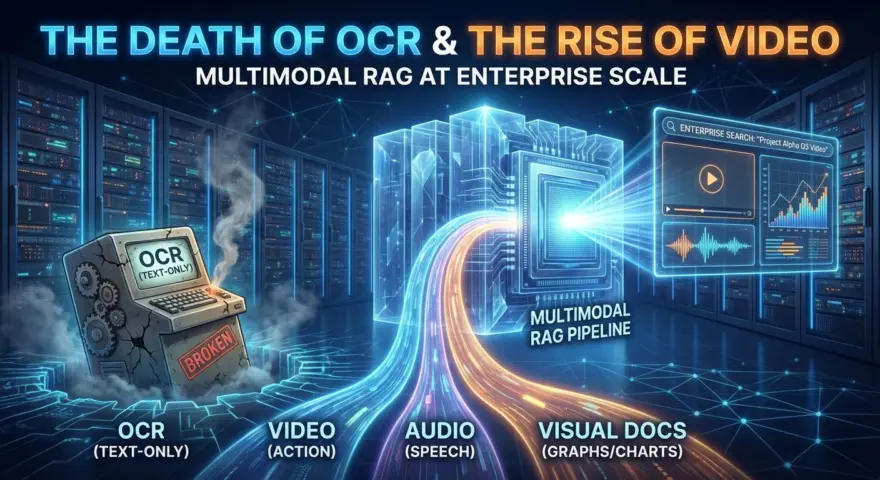
In 2024, “Multimodal RAG” was a hack. You would take a PDF, run Tesseract OCR to strip the text, maybe use a captioning model (like BLIP) to turn images into text, and then shove it all into a text-only vector database.
That architecture is now obsolete.
In 2026, we don’t “convert” media to text; we embed media natively. The release of models like Qwen3-VL-Embedding and ColPali has fundamentally shifted the unit of retrieval from “text chunks” to “visual patches.”
If you are an Enterprise Architect, your knowledge base isn’t just text. It is a messy swamp of Zoom recordings, whiteboard screenshots, and 100-slide architectural diagrams. Text-only RAG fails here because it loses the spatial layout and temporal context.
This guide outlines the 2026 Native Multimodal Stack—the architecture that finally kills OCR.
The 2026 Core Architecture: The “Three-Stream” Approach
The biggest mistake teams make is treating video as just “images + audio.” In a mature 2026 pipeline, we treat data as three distinct signal streams requiring specialized embedding strategies.
1. The Visual-Static Stream (Layout & Documents)
- The Problem: Standard RAG destroys the layout of a PDF. A financial table parsed into plain text loses its row/column relationships instantly.
- The Solution: ColPali (Late Interaction).
Instead of OCR, we use ColPali. It treats the entire document page as an image, cutting it into 32×32 visual patches and generating embeddings for each patch. - The Alpha: It uses Late Interaction (ColBERT-style). When you search “Revenue in Q3,” the model doesn’t just match a global vector; it matches the specific visual patch on the page where the “Q3 Revenue” cell is located.
2. The Visual-Temporal Stream (Action & Video)
- The Problem: Searching for “The moment the server crashed” in a 1-hour screen recording. Static frames miss the motion context (e.g., distinguishing between typing a command and the error that follows).
- The Solution: Qwen3-VL-Embedding (Native Video Embedding).
This is the 2026 state-of-the-art. We use Qwen3-VL-Embedding to generate unified dense vectors that capture temporal dynamics. It allows for “Action Retrieval”—finding segments based on what is happening, not just what is shown.
3. The Semantic Graph Stream (Entity Linking)
- The Problem: Vector search is probabilistic. It might find a whiteboard diagram, but not the specific one linked to “Project Alpha.”
- The Solution: Multimodal GraphRAG.
We use Vision-Language Models (VLMs) to extract entities from images (e.g., identifying “Person A” in a meeting video) and link them in a Knowledge Graph (Neo4j). This allows deterministic queries: “Show me every video frame where the CTO is standing next to the Architecture Diagram.”
The Blueprint: 3 Production Configurations
Below are the production-ready configurations to build this pipeline.
Configuration 1: The “ColPali” Indexer (No More OCR)
This Python script bypasses OCR entirely. It treats PDF pages as visual inputs and generates multi-vector embeddings using colpali_engine and Qdrant.
import torch
from pdf2image import convert_from_path
from colpali_engine.models import ColPali
from colpali_engine.processor import ColPaliProcessor
from qdrant_client import QdrantClient
from qdrant_client.http.models import VectorParams, Distance

# 1. Setup Vector DB (Must support Multi-Vector / Late Interaction)
# In 2026, Qdrant handles ColBERT-style multivectors natively.
client = QdrantClient(location=":memory:") # Use server URL in prod
client.recreate_collection(
    collection_name="colpali_docs",
    vectors_config={
        "colbert": VectorParams(
            size=128,  # ColPali default dim
            distance=Distance.COSINE,
            multivector_config={"comparator": "max_sim"} # Key: MaxSim operator
        )
    }
)

# 2. Ingest Document as IMAGES (Not Text)
def load_pdf_as_images(pdf_path):
    # Convert PDF pages to high-res bitmaps
    return convert_from_path(pdf_path)

pages = load_pdf_as_images("./finance_report_q3.pdf")

# 3. Load ColPali (The "Vision-Native" Embedder)
model_name = "vidore/colpali-v1.2"
model = ColPali.from_pretrained(model_name, torch_dtype=torch.bfloat16, device_map="cuda")
processor = ColPaliProcessor.from_pretrained(model_name)

# 4. Generate "Late Interaction" Embeddings
# Instead of 1 vector per page, we get ~1024 patch vectors (Bag of Vectors)
inputs = processor(images=pages, process_images=True, return_tensors="pt").to("cuda")

with torch.no_grad():
    # Returns [Batch_Size, Num_Patches, Dim]
    embeddings = model(**inputs)

# 5. Index into Vector Store
for i, emb in enumerate(embeddings):
    # Filter padding vectors based on attention mask in production
    valid_vectors = emb.cpu().float().numpy().tolist()

    client.upload_points(
        collection_name="colpali_docs",
        points=[{
            "id": i,
            "vector": {"colbert": valid_vectors}, # Multi-vector payload
            "payload": {"page_num": i, "source": "finance_report_q3.pdf"}
        }]
    )

print("✅ PDF Indexed visually. Charts, Tables, and Layouts are now searchable.")
Configuration 2: The Video “Action” Retriever (Qwen3-VL)
Use Qwen3-VL-Embedding to find specific moments in a video file by extracting temporal dense embeddings.
import torch
from transformers import AutoModel, AutoProcessor

# 1. Load Model (The 2026 Standard for Video Understanding)
# Note: Using the Embedding specific variant, not the Chat variant.
model_id = "Qwen/Qwen3-VL-Embedding-8B"
model = AutoModel.from_pretrained(model_id, trust_remote_code=True, torch_dtype=torch.bfloat16).cuda()
processor = AutoProcessor.from_pretrained(model_id, trust_remote_code=True)

# 2. Prepare Video Input
video_path = "server_incident_log.mp4"
inputs = [
    {
        "video": video_path,
        "text": "Describe the root cause analysis session shown in the terminal.",
    }
]

# 3. Preprocessing
# Qwen3-VL-Embedding handles frame extraction and temporal alignment automatically
model_inputs = processor(
    text=[inp["text"] for inp in inputs],
    videos=[inp["video"] for inp in inputs],
    padding=True,
    return_tensors="pt"
).to("cuda")

# 4. Generate Embedding (The "Encoder" Output)
with torch.no_grad():
    # The model uses a dual-tower architecture or EOS-pooling
    outputs = model(**model_inputs)
    # Shape: [Batch_Size, Hidden_Size] (e.g., 4096)
    video_embedding = outputs.embeddings

print(f"✅ Generated Temporal Embedding: {video_embedding.shape}")
# Next: client.search(collection="video_logs", vector=video_embedding)
Configuration 3: The Multimodal Graph Builder (GraphRAG)
This prompt instructs a VLM (Vision Language Model) to extract graph nodes from an image for deterministic retrieval.
ROLE: Multimodal Graph Architect (Senior Data Engineer)
TASK: Analyze the provided whiteboard screenshot and generate a Cypher query to insert the graph into Neo4j.

INPUT IMAGE: [Architecture Diagram]

RULES:
1.  Node Extraction: Identify all SYSTEM COMPONENTS (e.g., "Load Balancer", "Database") and ACTORS (e.g., "User", "Admin").
2.  Relationship Logic: Analyze arrows/lines to determine directionality and label (e.g., :CONNECTS_TO, :WRITES_TO).
3.  Contextual Linking: If a person is visible pointing to a component, link them: (Person)-[:EXPLAINS]->(Component).

OUTPUT FORMAT (Cypher ONLY):
// Create Nodes
MERGE (lb:Component {id: "LB_01", name: "Nginx Load Balancer", type: "Infrastructure"})
MERGE (db:Component {id: "DB_01", name: "Postgres Primary", type: "Database"})
MERGE (user:Actor {name: "DevOps Lead"})

// Create Relationships
MERGE (lb)-[:ROUTES_TRAFFIC {port: 443}]->(db)
MERGE (user)-[:MANAGES]->(lb)
Best Practices for 2026 Implementation
1. Don’t Index Every Frame (Adaptive Indexing)
A 1-hour video has 108,000 frames. Indexing all of them with Qwen3-VL is financial suicide.
The Fix: Use Adaptive Scene Detection. Only trigger embedding generation when the visual scene changes significantly (e.g., >5% pixel variance or histogram shifts). This reduces indexing costs by ~90% while retaining semantic density.
2. The Storage Hierarchy
Multimodal RAG requires massive storage compared to text.
- Hot Tier (NVMe/RAM): Vector Index (Weaviate/Qdrant). Stores only vectors and minimal metadata.
- Warm Tier (S3 Standard): Low-res thumbnails and keyframes. Used for UI rendering.
- Cold Tier (Glacier/Deep Archive): The original raw 4K video files. Retrieved only on demand.
3. Evaluation: “MiRAGE”
You cannot evaluate Multimodal RAG with text metrics like ROUGE or BLEU. In 2026, we use MiRAGE (Multimodal Retrieval Augmented Generation Evaluation).
The Metric: “Visual Grounding Score” — Does the retrieved image patch actually contain the visual evidence required to answer the prompt? If the model answers correctly but cites the wrong chart, it is a hallucination.
The era of “Text-Only” enterprise search is over. Your users live in a world of screenshots, video streams, and complex diagrams. If your RAG pipeline cannot “see,” it is already obsolete.
Start by replacing your OCR pipeline with ColPali. It is the single highest-ROI upgrade you can make in 2026.