Most prompt failures are not model failures. They happen because the wrong instruction gets placed in the wrong layer. A permanent rule gets buried inside a one-off request. A task-specific preference gets hard-coded into the system prompt. A tool contract gets written like friendly prose instead of an execution spec. The result is predictable: inconsistent outputs, malformed tool calls, scope drift, and agents that feel unreliable.
That distinction matters whether you work in ChatGPT, Gemini, Claude, or DeepSeek. The prompts below are optimized as a universal foundation for people building repeatable AI workflows across operations, support, product, research, and engineering. Each model has different strengths: ChatGPT works well for everyday prompt shaping, Claude is often the better fit for careful structure and policy reasoning, Gemini is useful when you need to absorb more source material, and DeepSeek is strong for logic-heavy decomposition.
Why This Distinction Breaks Workflows
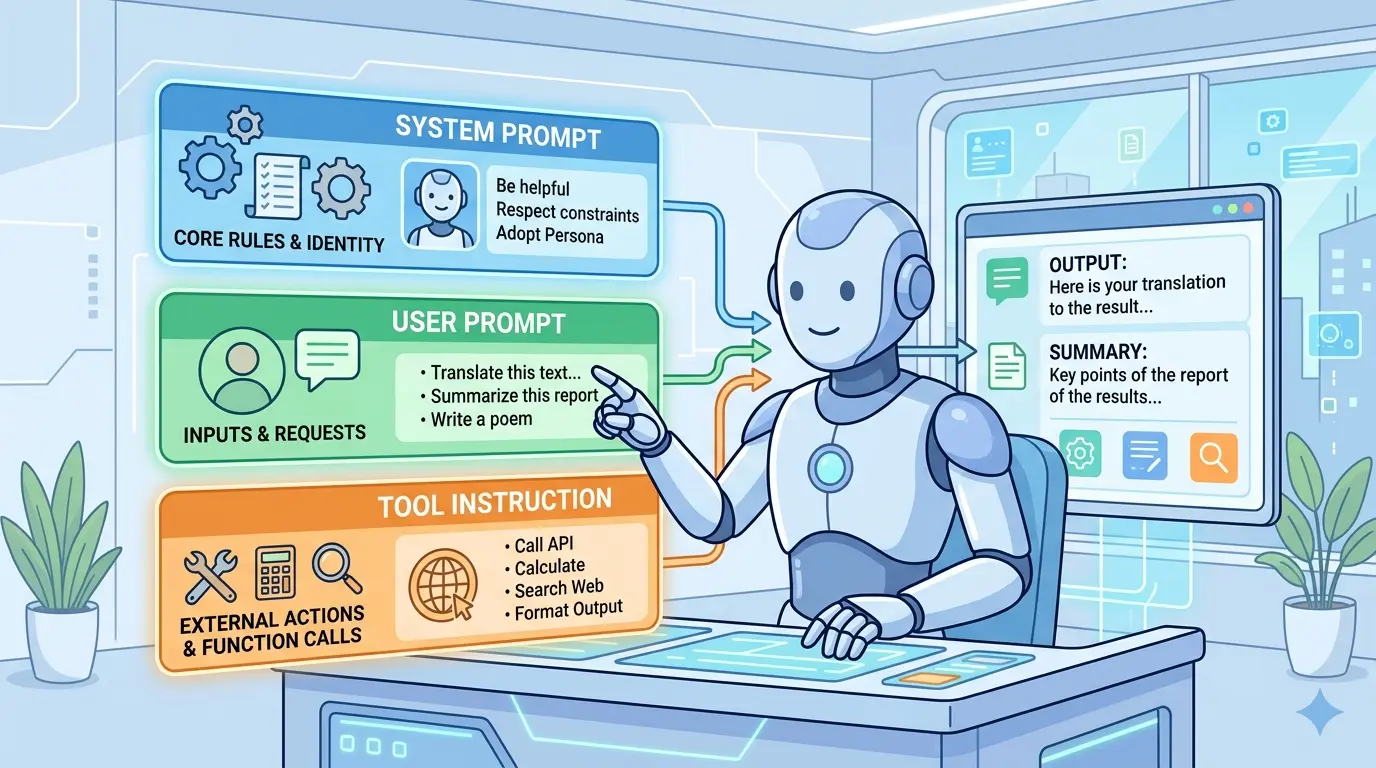
Most teams still write one large instruction block and expect the model to sort it out. That usually fails because each layer answers a different question. The system prompt defines who the model is allowed to be. The user prompt defines what job it should do right now. The tool instruction defines how execution must happen if a tool is involved.
If you already think about prompts as designed systems instead of one-off messages, Meta-Prompting Mastery: 10 Advanced AI Prompts for Professional Prompt Engineering is a natural companion to this layered approach.
The Three-Layer Mental Model
- System Prompt: Persistent role, boundaries, priorities, default behavior, and non-negotiable rules.
- User Prompt: The current task, business context, required output, local constraints, and acceptance criteria.
- Tool Instruction: The callable contract, including required inputs, validation rules, output format, safety constraints, and failure behavior.
A simple rule helps: if the instruction should survive across many tasks, it belongs in the system prompt. If it changes from request to request, it belongs in the user prompt. If it tells the model how to call or interpret a tool, it belongs in the tool instruction.
Write A System Prompt That Defines Non-Negotiables
Model Recommendation: Claude
Prompt:
You are helping me design the system layer for an AI workflow.

Create a durable system prompt for this use case:
- domain: [insert domain]
- assistant role: [insert role]
- primary goals: [insert goals]
- non-negotiable rules: [insert rules]
- forbidden behaviors: [insert list]
- response style defaults: [insert style]
- escalation conditions: [insert triggers]

Output:
1. the final system prompt
2. a short note explaining why each rule belongs in the system layer
3. a list of instructions that should NOT live in the system layer

Use concise operational language. Prefer durable rules over task-specific instructions. Include a clear priority rule for handling conflicts.
The Payoff: This helps you stop stuffing temporary requests into the top layer. A strong system prompt keeps behavior stable across many conversations without repeating the same policy every time.
Turn A Loose Request Into A Strong User Prompt
Model Recommendation: ChatGPT
Prompt:
Convert the rough request below into a production-ready user prompt.

Rough request:
[paste the request]

Assume a system prompt already exists, so do not repeat permanent role, policy, or style rules unless they are task-critical.

Build the user prompt with these sections:
- objective
- context
- inputs
- constraints
- acceptance criteria
- output format
- missing information that should be requested before execution

Make it explicit, compact, and executable.
The Payoff: Most day-to-day failures happen here, not in the model itself. This prompt turns a vague ask into a clean task definition without contaminating the system layer.
Design Tool Instructions That Machines Can Follow
Model Recommendation: DeepSeek
Prompt:
I need a tool instruction, not a user-facing explanation.

Given the tool below, write a strict tool instruction that an AI model can reliably follow.

Tool name: [name]
Purpose: [purpose]
Inputs: [fields]
Required validations: [rules]
Disallowed usage: [list]
Expected output schema: [schema]
Failure behavior: [what to do]

Return:
1. final tool instruction
2. strict parameter checklist
3. common failure modes caused by ambiguous wording

Write in contract language. Avoid persuasion, storytelling, and vague phrases such as "if helpful" or "use your judgment" unless explicitly required.
The Payoff: Tool instructions live closest to execution, so vague wording becomes expensive fast. This prompt helps you write interface rules that produce cleaner calls, safer behavior, and easier debugging.
Once your stack includes schemas, examples, and validation rules, context size stops being abstract. The AI Token Calculator is useful for deciding which details deserve system-level persistence and which should stay local to a single task.
Audit A Prompt Stack For Collisions
Model Recommendation: Claude
Prompt:
Audit this three-layer prompt stack for conflicts, overrides, and missing priorities.

System prompt:
[paste]

User prompt:
[paste]

Tool instruction:
[paste]

Tasks:
- identify contradictions
- identify duplicated rules living in the wrong layer
- identify tool instructions that are too vague to execute safely
- show which rule should win when conflicts occur
- rewrite only the minimum necessary lines

Output as a table with columns:
issue | layer | risk | fix | reason
The Payoff: This is the prompt you use before blaming the model. It exposes silent conflicts that make agents look inconsistent even when the real problem is prompt ownership.
Rewrite A Messy Single Prompt Into Three Layers
Model Recommendation: ChatGPT
Prompt:
Split the monolithic prompt below into three parts: system prompt, user prompt, and tool instruction.

Requirements:
- preserve intent
- move durable rules into the system prompt
- move task-specific goals into the user prompt
- move execution and interface rules into the tool instruction
- remove duplicated language
- explain every move in one sentence

Monolithic prompt:
[paste]

Return the cleaned three-layer stack plus a short rationale for each section.
The Payoff: This is one of the fastest ways to clean up prompt sprawl. Instead of endlessly editing a bloated instruction block, you separate responsibilities and make future changes easier to test.
For readers studying how orchestration at the top of the stack shapes downstream behavior, Google Antigravity System Prompts is a useful reference point.
Build A Reusable Prompt Stack From Real Documents
Model Recommendation: Gemini
Prompt:
Create a reusable prompt stack from the source material below.

Sources may include:
- SOPs
- style guides
- sample outputs
- policy documents
- tool documentation
- quality checklists

Your job is to produce:
1. one durable system prompt
2. one user prompt template with placeholders
3. one tool instruction per tool
4. one short rule explaining what belongs in each layer
5. one onboarding note for new team members using this stack

Optimize for reuse, low duplication, and clear ownership boundaries. Flag any missing source material before drafting.
The Payoff: This is where broader context really matters. When you need to synthesize multiple documents into one operating stack, Gemini is often the more practical fit.
Debug Why An Agent Ignored Instructions
Model Recommendation: DeepSeek
Prompt:
Diagnose why this agent ignored instructions.

Inputs:
- system prompt
- user prompt
- tool instruction
- execution trace or transcript
- observed failure

Classify the root cause as one or more of:
- wrong layer ownership
- conflicting priority
- vague tool contract
- overloaded context
- missing acceptance criteria
- hidden assumption in user prompt

Then provide:
1. root cause summary
2. the minimal fix
3. the correct layer for the missing or misplaced rule
4. one regression test prompt to prevent recurrence
The Payoff: Good debugging is not about adding more words. It is about putting the right rule in the right place and proving the failure will not repeat.
Use The Right Layer For The Right Job
If a rule feels important, that does not automatically make it a system prompt. System prompts should stay durable and sparse. User prompts should stay task-specific and measurable. Tool instructions should stay narrow, explicit, and testable. Once you treat those as different jobs, your AI stack becomes easier to reason about.
Pro-Tip: Chain your prompt design in this order: define the system prompt once, build reusable user prompt templates second, and lock down tool instructions last. When something fails, ask which layer should own the rule before you add more text. That single habit prevents most prompt sprawl.
The teams that get reliable results from AI are usually not writing longer prompts. They are assigning clearer responsibilities to each layer, then improving the stack with the same discipline they would use for code, specs, and interfaces.